=
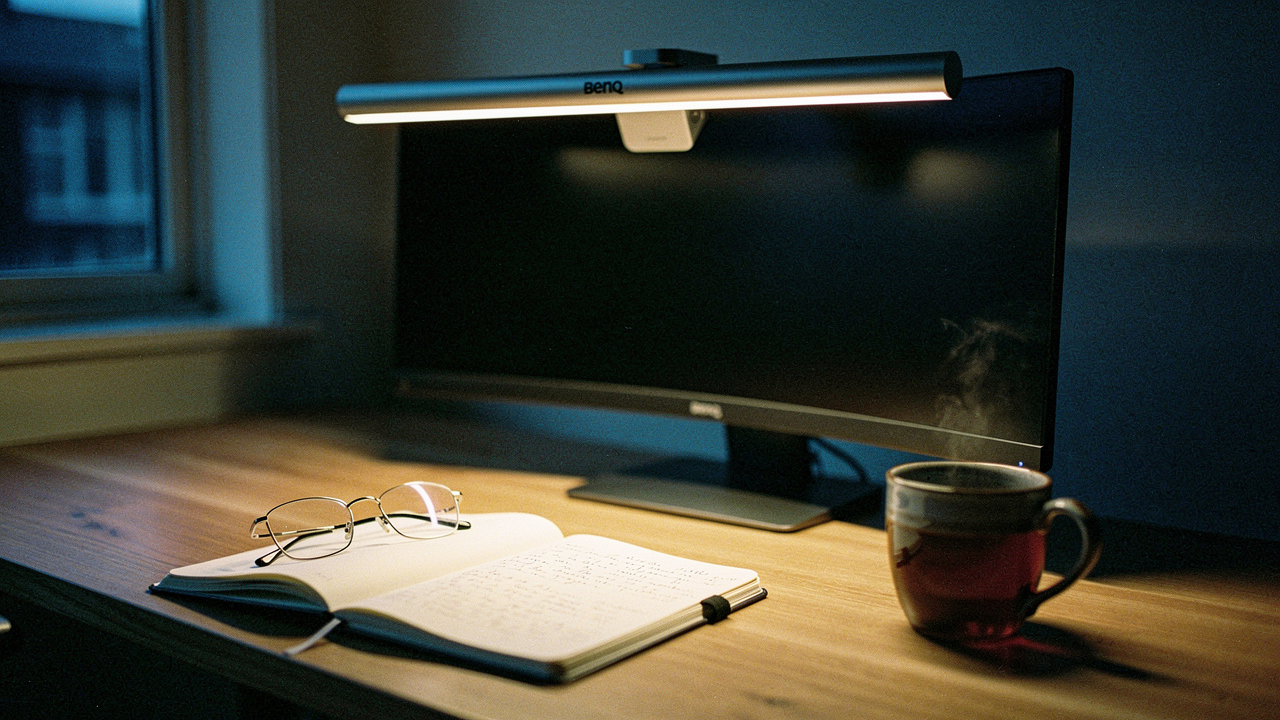
For years, I followed a simple rule: if it looks like it’s just there for the “aesthetic,” it’s probably a waste of money. But then I started seeing this strange, sleek black bar perched on top of every high-end monitor in my feed. It’s called a screenbar, and when I saw the price tag for the “gold standard” version—the BenQ ScreenBar Halo—I actually laughed. $179 for a lamp? I told myself it was the ultimate “scam” for people with more money than sense.
But as someone who spends 40+ hours a week staring at a screen—alternating between curating products for Best Goods for Good Life and researching my latest sourdough obsession—the end-of-day headaches were becoming a real problem. I decided to put my skepticism aside and put the hype to the test. Here’s what happened when I stopped judging and started clicking.
The Hype: Why I Expected to Hate This Desk Accessory
The “hyped desk accessory” phenomenon is real, and the BenQ ScreenBar series is the poster child for it. If you spend any time in the WFH corner of the internet, you’ve seen it. The marketing promises the moon: reduced eye strain, better focus, and a “clutter-free” workspace.
Here was my struggle: a standard, high-quality desk lamp at a local Austin shop might run you $20 to $40. The BenQ ScreenBar Halo sits at a staggering $179 [4]. To me, that felt like an “influencer tax.” I assumed people were buying it because it looked cool in photos, not because it actually did anything better than a basic bulb. I was prepared to write a scathing review about how we’ve all been fooled by clever industrial design.
Testing Methodology: 10-Hour Days and Austin Sunsets
To give this a fair shake, I didn’t just turn it on for a quick photo op. I integrated it into my actual life for two months. My routine is pretty intense: I’m at my desk by 8:00 AM with a large coffee, working through the bright Texas morning and often well into the evening when the sun sets over the Hill Country.
Industry benchmarks suggest that full-time desk workers are the primary audience for these “productivity” tools [1]. I fit that mold perfectly. I tested the light across different tasks—from detailed photo editing (where color accuracy matters) to late-night writing sessions where I usually find myself squinting at the screen. I wanted to see if a premium price point actually translated to a “High Lifestyle ROI.”
Why It’s Genuinely Worth It: The ROI of Your Eyes
I spent years thinking that a dull, throbbing pressure behind my eyes at 5:00 PM was just a mandatory part of being an adult with a laptop. I tried blue light glasses (meh), I tried turning my monitor brightness down (too dim), and I tried using a traditional desk lamp. The problem with the lamp was the glare; the light would bounce off my screen and right into my retinas, making the strain even worse.
After seeing the ScreenBar Halo everywhere, I finally caved. I was skeptical that a light sitting on my monitor wouldn’t cause more glare, but the engineering surprised me. The light is directed downward at an angle, illuminating the desk space without hitting the screen itself. Within three days, the evening headaches I’d treated as “normal” simply vanished. It turns out that proper task lighting is actually a validated health necessity, not just a luxury [2].
The real win here: It turned a $179 one-time expense into a long-term investment in my physical comfort.
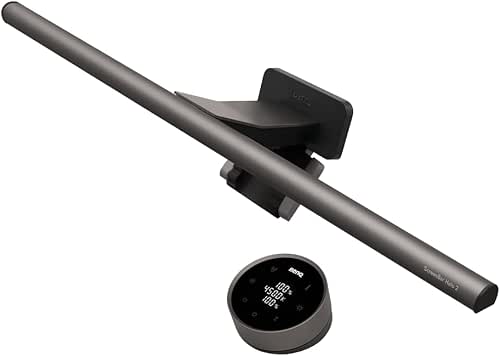

While the upfront cost is high, I like to look at the “Lifestyle ROI.” If you use this for five years, you’re looking at about $36 per year [4]. For less than the cost of a few Austin brunch outings, you’re essentially “buying” eye comfort for the next half-decade. The American Academy of Ophthalmology (AAO) notes that proper lighting is one of the most effective ways to combat digital eye strain, and for me, this was the first product that actually delivered on that promise [4].
Space Savings: The Desk Real Estate Factor
Here’s the thing about Austin apartment living: desk space is precious. My old desk lamp had a bulky base that took up the spot where I usually keep my journal or my water bottle. Because the screenbar mounts directly to the top of the monitor, it effectively gives you back that square footage [3]. It sounds like a small detail, but for a minimalist, it feels like a massive win.
Quality Surprises: BenQ vs. the $40 Amazon Clones
I know what you’re thinking: “Jordan, I can buy a knockoff on Amazon for $40.” I thought the same thing. I actually bought a cheaper version first, thinking I was being savvy.
It was a mistake. The cheap version flickered—sometimes so subtly you couldn’t see it, but your brain could feel it. The BenQ is TÜV-certified for being flicker-free and low blue light, which is a standard you rarely find in the “clones.” Then there’s the wireless controller. The Halo comes with a heavy, premium-feeling dial that sits on your desk. You spin it to adjust brightness or color temperature. It’s smooth, tactile, and honestly, a joy to use. Compared to the flimsy plastic buttons on the budget models, the quality difference is immediate and justified.
The ‘Worth It’ Framework: Should You Buy It?
I don’t believe in “one size fits all” recommendations. Here is how I break down whether this hyped accessory is a smart investment or a “waste of money desk item” for your specific life:
The Lifestyle ROI Decision Matrix
- The Power Professional (8+ Hours at Desk): This is a must-buy. The reduction in eye fatigue and the build quality will pay for itself in productivity and health within the first six months.
- The Student or Casual User: If you’re only at your desk for an hour or two a day, this is likely over-engineered for your needs. A standard lamp is fine.
- The Small-Space Minimalist: If your “office” is a corner of your bedroom, the space-saving mount is worth the premium alone.
- The Pro Upgrade: If you already have a great setup but suffer from late-night headaches, the wireless controller and precise dimming are the “final boss” of desk upgrades.
Bonus: Two Under-the-Radar ‘Hidden Gems’ I Use Daily
While we’re talking about things that are actually worth the money, I have to mention two much cheaper items that have surprised me with their utility.
I’ll admit, I thought a “desk vacuum” was the height of laziness. Then I started eating my sourdough toast at my keyboard while answering emails. I used to use a damp cloth, which just smeared crumbs into the crevices. I finally picked up a tiny, $10 battery-powered vacuum, and it’s become my favorite Sunday reset tool [3]. It’s surprisingly powerful and keeps my workspace pristine in about thirty seconds.
The game-changer: It makes cleaning the most tedious part of your setup actually satisfying.

Similarly, I struggled with “desk sprawl”—pens, SD cards, and lip balm ending up in a messy pile. I found a 5-compartment rotating organizer that looked a bit “office supply chic,” but it changed everything [5]. Because it rotates, I can tuck it into a corner and still reach everything without moving my monitor.
Bottom line: It solves the “pile” problem for less than the price of a fancy pizza.

References & Authoritative Sources
- Industry WFH Standards (2025). Digital Wellness for Remote Workers.
- OSHA (2025). Computer Workstation Ergonomics: Task Lighting Guidelines. https://www.osha.gov/etools/computer-workstations/components/lighting
- PCWorld (2024). Testing the Best Screenbars for Eye Strain.
- MakeUseOf (2024). BenQ ScreenBar Halo: A Long-Term ROI Analysis.
- Cosmopolitan (2024). Best Desk Organizers for Small Spaces.
Disclaimer: I bought these products with my own Austin-earned money. No sponsorship here, just honest lifestyle geekery. This post contains affiliate links, which means I may earn a small commission at no extra cost to you if you choose to shop through them. Thank you for supporting Best Goods for Good Life!