
At Best Goods for Good Life, I talk a lot about High Lifestyle ROI—the idea that the things we use every single day should be the things we invest in most heavily. We spend roughly 2,000 hours a year at our desks. If your environment is working against you, you’re not just losing productivity; you’re losing your well-being.
What follows isn’t just a shopping list. It’s the phased blueprint I wish someone had handed me when I first started working from home. It’s about moving from an “incomplete desk setup” to a space that actually supports your flow, rather than draining your battery.
The Anatomy of an Incomplete Desk Setup
Let’s be honest: most of us have an “accidental” workspace. It usually starts with a laptop on a flat surface. Then maybe we add a random lamp or a stack of books to prop up the screen. Before we know it, we’re dealing with what I call the “Incomplete Setup Syndrome.”
Here’s the thing—clutter isn’t just an aesthetic problem. Research shows that physical clutter in your workspace competes for your attention, significantly increasing your cognitive load and making it harder to focus [4]. When your cables are a tangled mess and you’re constantly hunting for a pair of scissors, your brain is subtly stressed.
I’ve seen it a hundred times: we tell ourselves we’ll “finish the office” once we hit a certain milestone. But “making do” has a hidden cost in the form of micro-frustrations and, eventually, physical pain. Transitioning from a dining table to a dedicated, finished office is a journey, but it starts with identifying the missing desk tools that are currently holding you back.
Phase 1: The ‘Health First’ Essentials (The Physical ROI)
If your body hurts, nothing else matters. You can have the fastest Wi-Fi in Texas, but if your neck is locked up, your output will suffer. This is where I recommend everyone starts. According to OSHA and NIOSH guidelines, your monitor should be at eye level and your elbows should rest at a 90-degree angle [1][2]. If you’re looking down at a laptop screen all day, you’re essentially asking for a chronic injury.
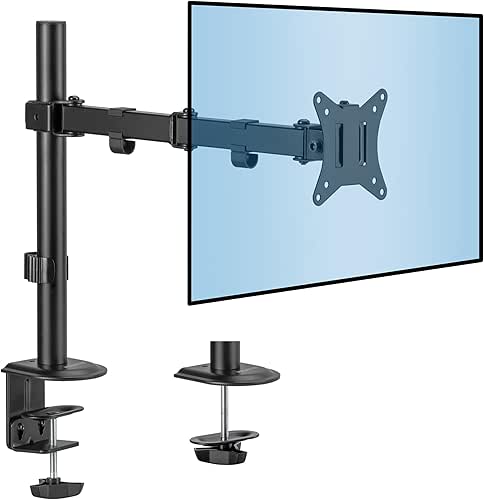
The Monitor Arm: Your Neck’s Best Friend
I’ll admit it—I spent way too long using a literal stack of “Sourdough for Beginners” books to raise my screen. It looked cluttered, it wasn’t stable, and it did nothing for my actual desk space. I finally realized that a static stand wasn’t enough because I needed to adjust my screen height depending on whether I was sitting upright or leaning back during a long reading session. Adding a gas-spring monitor arm changed everything. It cleared up nearly two square feet of desk “real estate” and allowed me to pull the screen closer for detail work or push it back when I needed a mental break.
Micro-Verdict: The ultimate cure for the “tech-neck” slouch.

External Input: Why Your Laptop Keyboard is Killing Your Wrists
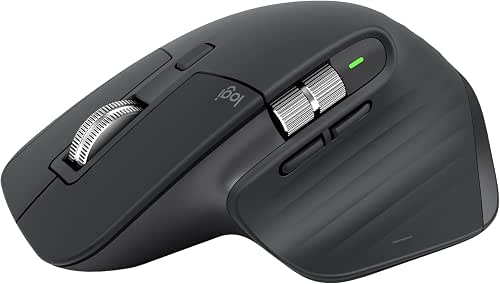
I used to think my laptop trackpad was “fine” until I started noticing a sharp twinge in my wrist every time I closed a tab. I was skeptical of those chunky “ergonomic” tools—I thought they looked a bit too much like something from a 90s cubicle. But after researching how a vertical or contoured mouse keeps your forearm in a natural “handshake” position, I made the switch. The difference in daily comfort was immediate. Pairing a high-quality mouse with a dedicated mechanical keyboard isn’t just about the satisfying “click”—it’s about giving your hands the space they need to breathe.
Micro-Verdict: A non-negotiable upgrade for anyone typing more than three hours a day.
Phase 2: Taming the Chaos (The Organizational ROI)
Once the physical pain is gone, we have to deal with the visual noise. You know that feeling when you sit down at a clean desk and suddenly feel like you can conquer the world? That’s what we’re aiming for here.
Under-Desk Cable Trays: The ‘Set it and Forget it’ Fix
For years, the floor under my desk looked like a spaghetti factory had exploded. I’d accidentally kick my power strip during Zoom calls, and my vacuum cleaner lived in constant fear of the tangled black vines lurking in the corner. I tried those little plastic clips, but they just kept peeling off the wall. What finally clicked for me was installing a proper steel cable tray under the desk. It hides the power bricks, the excess cords, and the power strip entirely. Now, when I look down, all I see is floor.
Micro-Verdict: The single best way to make a $100 desk look like a $1,000 setup.
The Desk Pad: More Than Just Aesthetics
I used to think desk pads were just for “aesthetic” Instagram photos. I was wrong. I struggled with my mouse stuttering on my wooden desktop, and the sound of my keyboard clacking against the hard surface was surprisingly grating during quiet morning journaling. I finally invested in a high-quality wool felt pad, and it felt like putting a silencer on my workspace. It defines the “work zone,” protects my desk from coffee rings, and provides a soft, warm place for my wrists to rest on chilly mornings.
Micro-Verdict: Adds instant warmth and sound-dampening to a sterile workspace.
Phase 3: Productivity Pro-Moves (The Output ROI)
This phase is about removing friction. Every time you have to crawl under your desk to plug something in, or squint because the sun is hitting your screen, you’re losing momentum.
The Thunderbolt Dock: One Cable to Rule Them All
The “dongle life” was my daily reality, and I hated it. Every time I took my laptop to a coffee shop and came back, I had to plug in five different things: the monitor, the mouse, the charger, my backup drive, and my speakers. It was a five-minute ritual that I dreaded. I eventually bit the bullet and bought a professional Thunderbolt docking station. Now, I plug in one single cable, and my entire world wakes up instantly. It felt like a luxury until I realized it was saving me about 20 minutes of “fiddling” time every single week.
Micro-Verdict: Turns your laptop into a powerful desktop workstation with one click.

Task Lighting: Reducing Eye Strain During Late Night Sprints
I relied on my overhead apartment lighting for way too long. It was either too dim, causing me to squint, or it created a nasty glare on my monitor that gave me headaches by 3 PM. I tried a traditional desk lamp, but it took up too much space and cast weird shadows. Then I discovered monitor light bars. They sit on top of your screen and cast light downward onto your documents and keyboard without ever touching the screen itself. Data shows that proper task lighting can significantly reduce eye strain and improve focus during high-intensity tasks [3].
Micro-Verdict: The “dark mode” essential you didn’t know you needed.

Phase 4: The ‘Zero-Borrow’ Toolkit (The Silent Heroes)
We’ve all been there: you need to sign a document or open a package, and you realize you don’t actually own a pen that works or a pair of scissors. You end up wandering into the kitchen, losing your train of thought, and getting distracted by the laundry. These are the “silent heroes” of the office—items you always forget until the moment you’re desperate for them [5].
To create a truly self-sufficient workspace, you need what I call the “Zero-Borrow” kit:
- The Essential Duo: A high-quality stapler and a heavy-duty tape dispenser (don’t buy the cheap plastic ones; they’ll break in a month).
- The Organization Core: Drawer dividers or a small desktop organizer for paper clips, post-its, and stamps.
- The Hygiene/Safety Layer: A small bottle of hand sanitizer, a box of tissues, and a basic first-aid kit (for those pesky paper cuts).
- The Focus Tool: A physical desk clock or a Pomodoro timer so you can keep your phone in the other room.
I recommend doing a “Quarterly Desk Audit.” Every three months, check your ink levels, restock your sticky notes, and make sure your “borrowed” scissors haven’t migrated back to the kitchen.
Priority Stack: What to Buy with Your First $100, $500, and $1,000
Building a dream setup is a marathon, not a sprint. If you’re looking at this list and feeling overwhelmed by the cost, here is how I would prioritize your investment based on “Regret ROI.”
| Budget | What to Buy First | The Impact |
|---|---|---|
| $100 | Cable Tray + Desk Pad + Basic Desk Lamp | Instant mental clarity and a cleaner surface. |
| $500 | Monitor Arm + Logitech MX Mouse + BenQ ScreenBar | Significant reduction in neck and eye strain. |
| $1,000+ | Thunderbolt Dock + Ergonomic Chair + Dual Monitors | Professional-grade productivity and long-term health. |
Here’s the truth: a desk is never really “finished.” Our needs change, our tech evolves, and sometimes we just want a fresh candle or a new plant to brighten the mood. But there’s a massive difference between a setup that is “evolving” and one that is “incomplete.”
The best time to buy these tools was probably a year ago, right before that first big project or that long week of overtime. The second best time is today. Don’t wait until your back is screaming at you to start taking your environment seriously. Your future self—the one who finishes work at 5 PM feeling energized instead of exhausted—will thank you.
Now, if you’ll excuse me, the sun is finally setting over the Austin skyline, and my dialed-in desk has helped me wrap up early. I’m heading out for a trail run at Lady Bird Lake.
Stay intentional, stay comfortable, and let’s make every day a little better.
***
Disclaimer: This post contains affiliate links. If you make a purchase through these links, I may earn a small commission at no extra cost to you. Please note that I am not a medical professional; ergonomic advice provided here is based on general OSHA and NIOSH guidelines and personal experience. Always consult with a specialist for chronic physical pain.
Sources & Further Reading
- OSHA, (2023). Computer Workstations eTool: Components – Monitors. Occupational Safety and Health Administration.
- NIOSH, (2022). Ergonomics and Musculoskeletal Disorders. National Institute for Occupational Safety and Health.
- BenQ, (2024). Desk Setup Ideas: A Complete Guide for Productivity. BenQ Knowledge Center.
- Majik Services, (2023). Clutter-Free Zen: How to Create a Minimalist Workspace. Majik Services Blog.
- London Post, (2023). The Silent Heroes of the Office: 10 Essentials You Always Forget. London Post Business.