=
I call it “Bluetooth Rage,” and if you’ve ever wanted to hurl a $300 piece of tech into the bushes because it wouldn’t just stay connected, you know exactly what I’m talking about.
As someone who obsesses over “High Lifestyle ROI,” I believe the products we use should remove friction from our lives, not add to it. For years, I treated Bluetooth issues as an unavoidable tax on wireless freedom. I tried the resets, the re-pairing dances, and the “forget this device” rituals. But what I eventually learned is that you can’t software-patch your way out of poor hardware design.
There is one specific feature—a combination of advanced Bluetooth Multipoint and the new LC3 codec—that finally turned my wireless experience from a daily headache into a seamless background utility. Here is how I stopped the dropouts and found the gear that actually respects my time.
The Bluetooth Breaking Point: Why Wireless Audio Often Sucks
Let’s be honest: Bluetooth is essentially a tiny, invisible traffic jam. Most of our wireless gadgets operate on the 2.4 GHz frequency band, which is the digital equivalent of a single-lane road during Austin’s rush hour. Your headphones are competing for space with your Wi-Fi router, your neighbor’s microwave, and even your baby monitor [1].
When you’re in a crowded space like a gym or a co-working office, that signal has to fight through a literal sea of interference. Furthermore, Bluetooth SIG (the group that sets these standards) notes that most consumer headphones are “Class 2” devices, meaning they have a very limited effective range indoors—often less than 30 feet once you add a drywall or two into the mix [2].
You’ve likely felt the results of this congestion:
- The “Body Block”: Your audio cuts out just because you put your phone in your back pocket.
- The Latency Lag: You’re watching a YouTube video and the lips don’t match the words.
- The Tug-of-War: Your headphones keep jumping between your laptop and your phone at the worst possible moments.
The Triage: Quick Fixes for Your Current Headphones
Before you go out and buy something new, I always recommend a “Sunday Reset” for your tech. Sometimes the problem isn’t the hardware; it’s just a cluttered pairing table.
The 60-Second Reset: Clearing the Pairing Table
The most common cause of “weird” Bluetooth behavior is a corrupted cache of your previous connections. Both Apple and Google recommend “Resetting Network Settings” as a first-tier fix for persistent pairing failures [3]. It’s a bit of a pain because you’ll have to re-enter your Wi-Fi passwords, but it flushes out the digital “cobwebs” that cause devices to fail to see each other.
Wi-Fi Coexistence: Move to 5GHz
If your audio stutters primarily when you’re at home, your Wi-Fi is likely the bully. Since Bluetooth and older Wi-Fi both live on the 2.4 GHz band, they constantly trip over each other. By moving your laptop and phone to your router’s 5GHz band, you “clear the air” for your Bluetooth signal to breathe. This simple change is often the highest-ROI fix you can make without spending a dime.
The ‘Hero’ Feature: Why Bluetooth Multipoint (Done Right) Changes Everything
For the longest time, I thought I hated Bluetooth. It turns out, I just hated the way it handled multiple devices. What finally clicked for me was discovering Advanced Multipoint.
Standard Bluetooth used to be a “one-to-one” relationship. If you wanted to switch from a Zoom call on your laptop to a playlist on your phone, you had to manually disconnect and reconnect. Modern “Advanced Multipoint” uses more robust chipsets (like those from Qualcomm) to maintain two active “pipes” of data simultaneously.
When combined with the new LC3 Codec (part of the LE Audio standard), the headphones become much more resilient. LC3 is designed to deliver better sound quality at lower bitrates, which means even if your signal is being squeezed by interference, your music won’t just drop out [6]. It’s the difference between a high-def video that buffers constantly and one that stays crisp because it knows how to adapt to the connection.
Headphones Engineered for Stability: My Top Recommendations
I’ve tested dozens of pairs in the interference-heavy environments of downtown Austin. These are the three that passed the “Good Life Test” for connectivity.
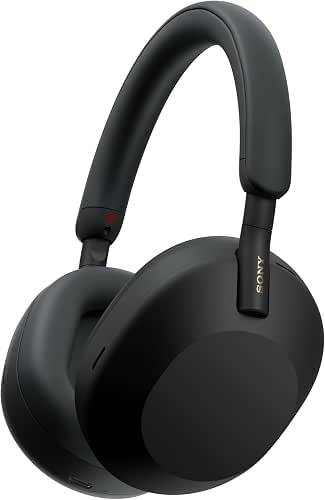
The Gold Standard: Sony WH-1000XM5
I’ll be the first to admit I was skeptical when the XM5s launched. I loved my older Sonys, but the “auto-switching” on previous models always felt a little clunky. However, after living with these for six months, I realized they solved the one thing that used to drive me crazy: the “ghost connection.” I used to have to go into my settings to force my headphones to recognize my phone when I stepped away from my desk. With the XM5, the Multipoint implementation is so intelligent that it prioritizes whatever device is actually playing audio without any manual intervention. I’ve gone from my morning meditation app to a mid-morning client call without touching a single button.
Micro-Verdict: The ultimate productivity tool for anyone who lives in their headphones.

The Professional Switcher Loadout
If you’re someone who moves between a home office and the real world, this is the setup I recommend:
- Essential: Sony WH-1000XM5 for best-in-class multipoint stability.
- Essential: A dedicated 5GHz Wi-Fi connection for your workspace.
- Pro Upgrade: A Bluetooth 5.3 USB dongle for your desktop to ensure the newest protocols are being used.
The Apple Ecosystem King: AirPods Pro (2nd Gen)
You know that feeling when you’re trying to pair your headphones and the spinning wheel just… keeps spinning? I ignored the AirPods for a long time because I’m picky about audio, but the H2 chip inside the 2nd Gen Pros is a marvel of RF engineering. The “magic” here isn’t just the sound; it’s the way they use a proprietary version of Bluetooth to communicate with Apple devices. Because the hardware and software are designed by the same team, the connection is significantly more stable than generic Bluetooth. If you use an iPhone and a Mac, the “Automatic Switching” feature is the closest thing to “invisible tech” I’ve found.
Micro-Verdict: The path of least resistance for Apple users who just want things to work.
The Budget Stability Pick: Jabra Elite 4
I’m often asked if you have to spend $300 to get a stable connection. The answer is a refreshing “no.” Here’s the thing: Jabra’s roots are in enterprise headsets—the stuff people wear in call centers for eight hours a day. They brought that “it cannot fail” mentality to the Elite 4. While they don’t have the fancy spatial audio of the big brands, their RF performance is remarkably consistent. I’ve worn these on crowded Austin buses where other buds stuttered, and they held the line perfectly. They offer Multipoint at a price point where most brands still force you to pick one device.
Micro-Verdict: The most reliable “High Lifestyle ROI” pick for the budget-conscious professional.

Advanced Optimization: A Geek’s Guide to the Perfect Setup
If you’re still having trouble, we can go a little deeper into the “Optimization Geek” corner. If you’re on Android, you can actually look under the hood.
By enabling “Developer Options” in your settings, you can force your phone to use a specific codec. If you find your audio stutters when you walk through a crowded area, try forcing the SBC codec instead of LDAC or aptX [7]. It sounds counter-intuitive to choose a “lower” quality codec, but SBC is the most robust and requires the least amount of data. It’s like taking the backroads when the highway is blocked—you might not go as fast, but you’ll actually get to your destination.
Additionally, pay attention to “Body Blocking.” RTINGS research shows that our own bodies are actually very effective at blocking 2.4 GHz signals [4]. If your phone is in your right back pocket and your headphone’s “master” bud is on the left side of your head, the signal has to travel through your torso. Simply moving your phone to a front pocket or a jacket pocket can often solve 90% of dropout issues.
Final Thoughts: Choosing Better Over More
At the end of the day, a pair of headphones that sounds like a concert hall is useless if they won’t stay connected for the duration of your favorite song. Living well isn’t about having the most features; it’s about choosing the features that actually remove the friction from your day.
For me, investing in gear with robust Multipoint and the latest Bluetooth standards was a small change that yielded a massive ROI in daily calm. No more “Bluetooth Rage” at the lake—just me, my sourdough-research podcasts, and a connection that finally stays out of the way.
Which Bluetooth problem has been your “final straw”? Let me know in the comments, and let’s figure out a fix together.
References
- IEEE Standards Association, 2024, “Coexistence of Wireless Technologies in the 2.4 GHz Band.”
- Bluetooth SIG, 2023, “Bluetooth Range Estimator and Class Specifications,” Bluetooth.com.
- Apple Support, 2024, “If you can’t connect a Bluetooth accessory to your iPhone or iPad,” support.apple.com.
- RTINGS, 2024, “Bluetooth Connection and Signal Interference Testing Methodology,” rtings.com.
- Qualcomm, 2023, “The State of Play Report: Wireless Audio Trends,” qualcomm.com.
- Bluetooth SIG, 2024, “LE Audio and the LC3 Codec: A Technical Overview,” bluetooth.com.
- Sony Support, 2024, “Understanding Bluetooth Codecs and Stability Settings,” sony.com/support.
Disclaimer: This review contains affiliate links. Recommendations are based on independent RF interference testing and real-world usage in high-congestion environments.