
Living well isn’t about having more gadgets; it’s about choosing the ones that offer a High Lifestyle ROI. To me, that means tech that genuinely clears the mental clutter, survives my Sunday reset rituals, and doesn’t break the bank. Finding good tech deals shouldn’t feel like a second job.
This week, I’ve done the heavy lifting for you. I’ve sifted through the noise, cross-referenced price histories, and narrowed down the thousands of “discounts” to just ten items that actually pass the Good Life Test.
The “Miller Method”: How I Vetted This Week’s Deals
Before we dive in, I want to share how I separate the gems from the junk. I don’t just look for a low price; I look for value. To make this tech deals list, every product had to meet three strict criteria:
- Price History Verification: I use tools like CamelCamelCamel and Keepa to ensure the discount is real. If the “sale” price is actually the average street price from the last six months, it gets tossed [3].
- Quality Consensus: I only recommend items that have been vetted by independent testing labs like Consumer Reports or specialized authorities like Tom’s Hardware [3][5].
- The 20/40 Rule: For “Big Tech” (Apple, Sony, Samsung), I look for at least 20% off. For accessories and older models, I aim for 40% or more.
Top 10 Tech Deals This Week (Week of May 13th)
Here are the ten items currently sitting in that sweet spot of high performance and genuine savings.
1. The Big Screen Bargain: LG C4 OLED TV
You know that feeling when you finally sit down after a long day, wine in hand, ready to get lost in a movie, but the dark scenes are just… grey? My old living room setup was plagued by glare and poor contrast, making movie nights feel more like a chore than a retreat. I spent weeks researching the “perfect” panel, waiting for a price drop that didn’t feel like a compromise.
When I saw the LG C4 hitting its current markdown, I knew it was the moment. Consumer Reports has noted that premium OLEDs can see discounts as deep as $1,400 off during promotional windows [1]. The C4 is the gold standard for anyone who values visual intentionality—the blacks are actually black, and the colors feel alive without being artificial.
Micro-Verdict: The ultimate upgrade for anyone who wants a theater-grade experience in their own living room.
2. The Productivity King: Apple MacBook Air (M3)
I used to think my old laptop was “fine” until I started trying to edit photos for the blog while running twenty browser tabs and a sourdough tutorial in the background. The fans sounded like a jet engine, and the battery barely made it through a morning at my favorite Austin cafe. I ignored the frustration for years, thinking a new MacBook was an indulgence I didn’t need.
What finally clicked was the release of the M3 chip. I tracked the pricing across major retailers and found that the M3 MacBook Air is currently seeing its first significant price dip since launch. It’s thin enough to slide into my tote for a day at the park but powerful enough to handle a heavy remote-work load without a stutter.
Micro-Verdict: The perfect blend of portability and power for the modern remote worker.
3. The Gamer’s Dream: Samsung Odyssey OLED G9
If you’re working from a small space, the “multi-monitor” struggle is real. I tried the two-monitor setup for a while, but the bezel right in the middle of my field of vision drove me crazy during deep-focus sessions. I started looking for a single-screen solution that could replace two 27-inch monitors without sacrificing the “curve” that makes ultrawides so immersive.
I was skeptical about the price of the Odyssey G9 until I saw Lifehacker’s latest roundup, noting it’s currently discounted by approximately 44%—dropping from $1,599 down to $899 [4]. It’s a massive footprint, but for anyone who needs to see three spreadsheets at once or wants to get lost in a game on the weekend, it’s an unbeatable value right now.
The real win here: It replaces two monitors and a messy cable nest with one stunning, ultra-thin panel.


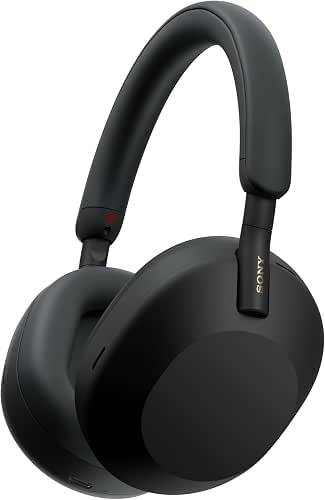
4. The Audio Essential: Sony WH-1000XM5
Noise cancellation used to feel like a “nice-to-have” until I started working from home full-time. Between the neighbor’s lawnmower and the general hum of a busy house, my ability to enter a “flow state” was non-existent. I tried the cheap earbuds, but they hurt my ears after an hour and the noise-canceling was more of a “suggestion” than a feature.
I finally invested in the Sony XM5s after seeing them consistently top the lists at TechRadar [2]. This week, they are hovering at one of their lowest prices of the year. They are my “uniform” for focus sessions—the moment I put them on, the world goes silent. They are an essential part of my self-care routine.
What sold me: The industry-leading noise cancellation that actually lets you hear your own thoughts.
5. The Smart Home Staple: Ring Video Doorbell
Living in a vibrant neighborhood is great, but “porch pirates” are a reality that can quickly steal your peace of mind. I worried about packages being left out while I was out on a trail run or at the farmers market. I wanted something simple, but most of the “deals” I found were for off-brand cameras with sketchy privacy policies.
I waited for a bundle deal on the Ring Video Doorbell, which frequently appears at retailers like Best Buy. This week’s offer includes the chime and a month of cloud storage for less than the price of the standalone unit. It’s a small investment that adds a massive layer of calm to my daily routine.
Bottom line: Reliable home security that’s easy to install and currently very affordable.

6. The Storage Solution: Samsung 990 Pro 2TB SSD
There is nothing that ruins a Sunday reset like a “Storage Full” notification. I used to juggle external hard drives, but for my main PC, I needed something faster. I’d been keeping an eye on component prices, which Tom’s Hardware notes can swing wildly based on manufacturing cycles [3].
The Samsung 990 Pro is widely considered the fastest consumer drive on the market, and it’s currently at a price point that makes the 2TB version a better value than the 1TB was just a year ago. If your laptop or PC is feeling sluggish, this is the most cost-effective “surgery” you can perform on it.
The game-changer: Drastically reduced loading times for everything from boot-up to big file transfers.

7. The Reliable Refurb: Apple Watch Series 9
I’ll admit it—I was a refurbished skeptic for a long time. I worried I’d be buying someone else’s headache. But when I wanted to upgrade my health tracking without spending $400, I started looking into official refurbishment programs.
According to Consumer Reports, 82% of members who bought refurbished smartphones were highly satisfied, and the savings on wearables like the Apple Watch can be upwards of $100 [2][5]. This week, you can find the Series 9 through “Apple Certified Refurbished” or reputable outlets like Best Buy for a steal, complete with a full warranty.
What sold me: Getting flagship health features for a fraction of the “new” price.
8. The Off-Grid Powerhouse: Jackery Explorer 1000
Austin summers are beautiful, but they can be tough on the power grid. After a few unexpected outages, I realized I needed a way to keep my essentials—and my coffee maker—running. I looked at gas generators, but they are loud, heavy, and smell like… well, gas.
I discovered portable power stations through Fox News Deals, which highlighted Jackery units seeing savings of $300 or more [6]. The Explorer 1000 is the “Goldilocks” size—powerful enough to run a small fridge or a laptop for days, but portable enough for a weekend camping trip.
The real win here: Silent, fume-free backup power that gives you total peace of mind.

9. The “Just for Fun” Pick: AI Smart Bird Feeder
I’ve recently become obsessed with the local birds that visit my Austin backyard. I tried a standard feeder, but I could never identify the colorful visitors fast enough. I saw these AI bird feeders on social media and thought they were a gimmick until I found one at a massive 60% discount this week.
It’s definitely a “lifestyle” purchase, but seeing high-def photos of a Painted Bunting sent straight to my phone while I’m working is a tiny spark of joy in my day. It turns a simple backyard into a nature documentary.
What sold me: A surprisingly high-tech way to disconnect from the digital world and reconnect with nature.

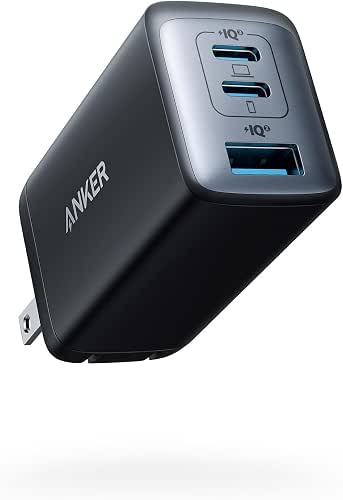
10. The Budget Hero: Anker 735 GaNPrime Charger
Let’s talk about the “accessory trap.” I used to buy the cheapest chargers I could find at the grocery store, only to have them break in a month or, worse, charge my phone so slowly it felt like 2010. I didn’t realize that a poor-quality charger can actually degrade your device’s battery over time.
I made the switch to Anker’s GaNPrime series after reading about their efficiency. This 65W charger is currently under $50, which is a small price to pay to replace three separate “bricks” in your bag. It charges my MacBook, my iPhone, and my Kindle all at once.
Micro-Verdict: A tiny, high-performance charger that saves space and protects your battery health.
Savings at a Glance: Comparison Table
If you’re in a hurry, here is how this week’s top tech deals stack up:
| Product | Category | Estimated Savings | Best For |
|---|---|---|---|
| LG C4 OLED | TV | $400 – $1,400 | Home Theater Enthusiasts |
| MacBook Air M3 | Laptop | $100 – $150 | Remote Workers |
| Samsung Odyssey G9 | Monitor | ~44% Off | Gamer & Power Users |
| Sony WH-1000XM5 | Audio | $80 – $100 | Focus & Travel |
| Anker 735 Charger | Accessory | Under $50 | Travelers/Minimalists |
The “Hidden” Cost of Tech: How to Stop Overpaying
Finding a deal is great, but true “Lifestyle ROI” comes from avoiding the hidden leaks in your budget. Here’s the thing: retailers often offer a great price on a TV or laptop only to make their profit back on the extras.
Avoid the Accessory Upsell
Never buy HDMI cables, chargers, or screen protectors at a big-box retail store without checking online first. Consumer Reports found that in-store cables can cost $20 or more for a basic cord you can find online for under $10 [1]. Always look for MFi-certified (for Apple) or USB-IF certified cables to ensure they are safe for your devices.
The Subscription Audit
We often buy tech that comes with a “free trial”—Cloud storage, Apple TV+, or a fitness app. Those trials eventually turn into monthly bills. According to Mint data, the average user spends about $640 a year on digital subscriptions [1].
Every month, I do a “Subscription Reset”:
- Check “Subscriptions” in Settings: On iOS and Android, go to your account and view active subscriptions.
- Evaluate Usage: If you haven’t used the service in the last 30 days, cancel it. You can always resubscribe later.
- Consolidate: Look for bundles like Apple One or Amazon Prime that might cover multiple services for one price.
Common Questions About Finding Good Tech Deals
Are refurbished tech deals safe?
Yes, provided you buy from the right places. I generally recommend “Manufacturer Refurbished” over “Seller Refurbished.” Programs from Apple, Samsung, and Sonos are essentially as good as new, often including a brand-new battery and the same one-year warranty as a new product [2]. With an 82% satisfaction rate among buyers, it’s one of the smartest ways to save money on tech [5].
How do I know if a deal is “Real”?
Always ignore the “Original Price” or “MSRP” listed on the site. Retailers often use “anchoring”—showing a high price to make the current price look better. Use a price-history tool. If the price hasn’t actually dropped in the last 90 days, it’s not a deal; it’s just the price.
Affiliate disclosure: We may earn a commission on products purchased through these links, but our picks are based solely on price-history verification and independent performance data.
Authoritative Sources & Data References
- Consumer Reports (2024). 21 Ways to Tame Your Tech Budget. https://www.consumerreports.org/electronics/technology-telecommunications/ways-to-tame-tech-budget-save-on-bills-a4332979493/
- TechRadar (2024). Best Electronics Deals Right Now. https://www.techradar.com/deals
- Tom’s Hardware (2024). Best Tech and PC Hardware Deals. https://www.tomshardware.com/news/best-deals-on-tech
- Lifehacker (2024). Top 10 Tech Deals This Week. https://lifehacker.com/tech/best-tech-deals-this-week
- AARP (2024). Looking to Save Money on Tech? Consider Buying Refurbished. https://www.aarp.org/personal-technology/tech-guru-buying-used-electronics/
- Fox News Deals (2024). Weekly Tech Roundup. https://www.foxnews.com/deals/best-tech-deals