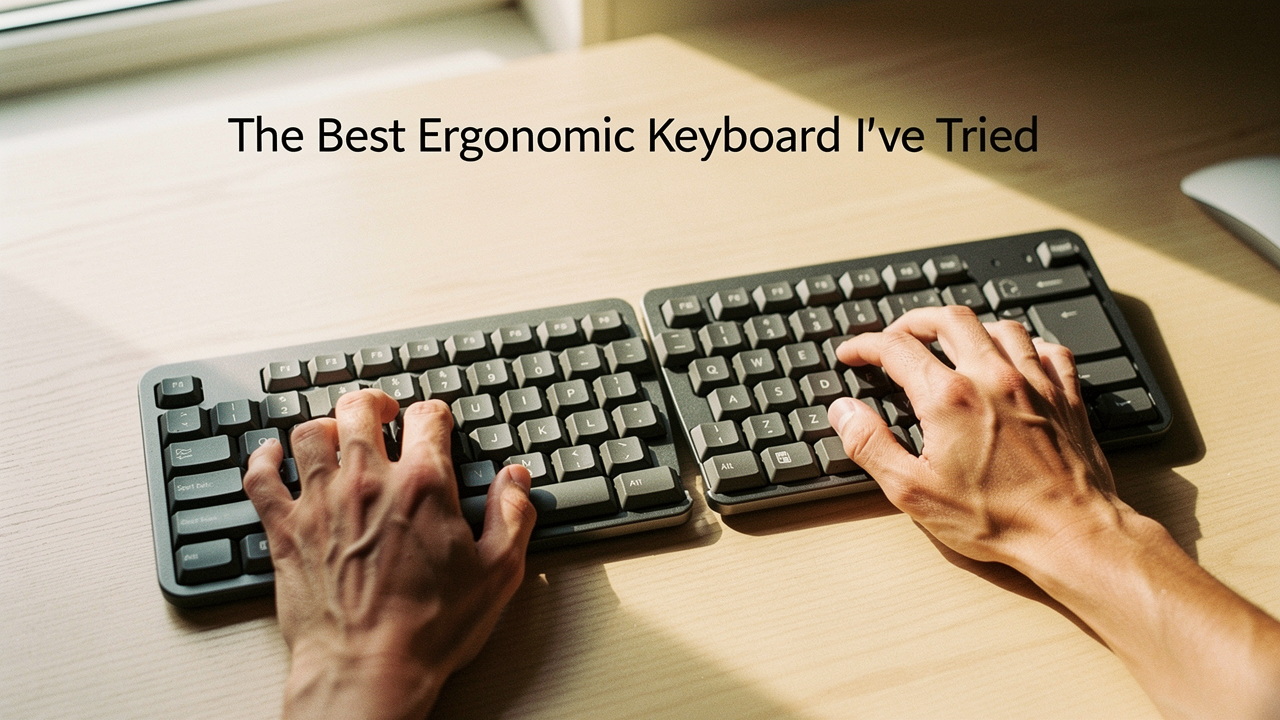
=
As someone who preaches “High Lifestyle ROI,” I felt like a hypocrite. We spend so much time curating our homes and our wellness routines, yet we often ignore the tool we touch more than anything else: our keyboard. Here is the reality: a high-quality ergonomic keyboard might cost $150 or $300, but compared to the $10,000+ cost of carpal tunnel surgery or months of physical therapy, it is one of the best investments you can make for a “good life.”
In this guide, I’m breaking down why standard keyboards are actually designed against our anatomy and sharing the specific models that finally allowed me to type for hours without a hint of fatigue.
Why Your Current Keyboard Might Be Causing Pain
Most of us use the flat, rectangular keyboards that come free with a computer. While they look sleek, they force our bodies into what I call “the three biomechanical crimes.”
First, there’s ulnar deviation, which happens when you’re forced to angle your wrists outward to reach the keys on a straight board. Then there’s pronation, the act of turning your palms flat to the floor, which crosses the two bones in your forearm and creates tension. Finally, many of us are guilty of wrist extension—angling the hands upward.
What surprised me during my research was a commentary from Houston Methodist: flipping those little plastic “legs” up at the back of your keyboard to tilt it toward you is actually one of the worst things you can do [10]. It increases wrist extension strain significantly. The National Institute for Occupational Safety and Health (NIOSH) has long warned that this kind of repetitive strain is a primary driver for developing musculoskeletal disorders [2].
The Three Pillars of Keyboard Ergonomics
To fix these “crimes,” look for three specific features:
- Split Design: Keyboards that are either physically two separate pieces or “angled” in the middle. This allows your arms to stay shoulder-width apart, preventing you from hunching.
- Tenting: This refers to the keyboard being higher in the middle than at the sides. It allows your hands to rest at a more natural “handshake” angle, reducing forearm pronation.
- Negative Tilt: Instead of the back being higher, the front (the side near you) is slightly higher. This keeps your wrists in a neutral, straight line rather than bent upward.
The Best Ergonomic Keyboard for Most People: Logitech Ergo K860
I’ll be honest: I was skeptical about “wave” keyboards for a long time. They looked a bit bulky for my minimalist aesthetic, and I wasn’t sure if a fixed, unibody design could really make a difference. But after a particularly brutal week of deadline-induced wrist ache, I decided to give the “gold standard” a real shot.
What I found was that the learning curve was almost non-existent. Within ten minutes, I was back to my normal typing speed, but the relief was instant. The curved keyframe naturally guides your hands into a “tented” position without you having to think about it. The integrated, pillowed wrist rest is a game-changer—it’s actually three layers of material designed to provide 54% more wrist support than a standard keyboard [1].
Micro-Verdict: The perfect “plug-and-play” solution for anyone who wants immediate relief without relearning how to type.


Pros, Cons, and Who It’s For
The K860 is fantastic because it balances ergonomics with familiar features like a full number pad. However, it does have a massive footprint. If you have a tiny “cloffice” or a very shallow desk, you might find it takes up a bit too much real estate.
The Best For:
- Administrative Professionals: Those who need a number pad for spreadsheets but want to end the day without throbbing wrists.
- The “Ergo-Curious”: People who know they need a change but are intimidated by “split” keyboards.
- Mac and Windows Users: It switches between both operating systems seamlessly.
The Pro Choice: Kinesis Freestyle2 (The Split King)
There came a point in my journey where “pretty good” wasn’t enough. I started noticing that even with a curved keyboard, my shoulders felt tight. Here’s the thing: most keyboards force your hands together in front of your chest, which makes your chest muscles tight and your upper back weak. I realized I needed to open up my posture entirely.
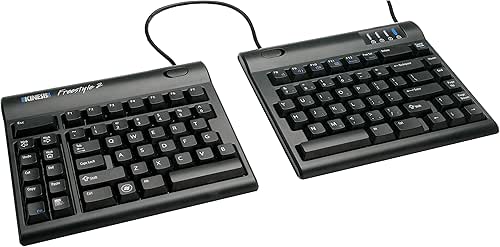
I found the Kinesis Freestyle2 after reading a case study about a researcher who finished a nearly 200-page dissertation pain-free using this exact board. I’ll admit, seeing the keyboard in two separate halves connected by a wire was a bit of a “mad scientist” moment for my desk setup. But once I moved the halves ten inches apart, I felt my chest open and my breathing improve. It wasn’t just my wrists that felt better—it was my whole upper body.
Micro-Verdict: An absolute powerhouse for posture that allows you to customize the width to your specific shoulder span.
The 20-Inch Secret: Why Width Matters
The “Standard” version comes with a 9-inch separation, but if you really want to optimize, look for the 20-inch separation model. This allows you to place the keyboard halves on either side of a laptop or even put a tablet or notepad in between them. TechGearLab actually measured the key-operation force of the Freestyle2 at about 43 gram-force, which is incredibly light and prevents your fingers from feeling “bruised” after a long day [4].
The Professional Persona Loadout
- Essential: Kinesis Freestyle2 with the “VIP3” Tenting Kit (essential for the handshake angle)
- Essential: A high-quality palm support to keep your wrists level
- Pro Upgrade: A separate mechanical tenkey (number pad) that you can move out of the way when not in use
Advanced Options: Columnar Layouts and The Learning Curve
If you’re a developer, a heavy-duty coder, or just someone who loves the absolute peak of home optimization, you’ll eventually hear about “columnar” keyboards like the MoErgo Glove80 or the ZSA Moonlander.
Unlike standard keyboards where the keys are “staggered” (a leftover from old typewriters!), columnar keyboards align keys in straight vertical rows. This matches the natural movement of your fingers. Carisa Harris, PhD, CPE at UC Berkeley, emphasizes that matching your keyboard to your specific body size and task is the key to long-term health [4].
However, let’s be real: these have a steep learning curve. Monsgeek and other community reviews suggest it takes about 1 to 3 weeks to get your speed back up [13]. If you’re in the middle of a high-stress project, maybe wait until a slow week to make the switch.
The High-ROI Setup: More Than Just a Keyboard
In Austin, we love our standing desks, but an ergonomic keyboard is only half the battle. If your desk is too high, you’ll still end up with “tech neck.” According to the Cleveland Clinic, your elbows should be at a 90 to 110-degree angle, and your feet should be flat on the floor (or a footrest) [8].
FlexiSpot’s ergonomics research highlights that poor posture leads to “spinal dysfunction” over time [9]. When I’m setting up my Sunday reset, I always check my monitor height first. Your eyes should be level with the top third of the screen. This ensures that your new, fancy keyboard isn’t being undermined by a neck that’s craned forward.
When to See a Professional
I’m an optimization enthusiast, not a doctor. While these tools have changed my life, they aren’t a substitute for medical care. The Hand and Wrist Institute suggests watching for “Red Flags” that indicate your discomfort has moved into the territory of a clinical Repetitive Strain Injury (RSI) [7].
RSI Red Flags:
- Numbness or tingling in the thumb and first two fingers (often a sign of carpal tunnel).
- Pain that wakes you up at night.
- Weakness when trying to grip a coffee mug or turn a doorknob.
- Pain that persists even when you aren’t at your desk.
If you’re experiencing these, please go see a physical therapist or a doctor. Sometimes, we need more than a new gadget to heal.
Creating a space that supports you is about more than just aesthetics. It’s about ensuring that your body can keep up with your ambitions. Just like my sourdough starter needs the right temperature and environment to thrive, our bodies need the right ergonomic environment to produce our best work.
The “best” keyboard is ultimately the one that you find comfortable enough to forget it’s even there. For me, that meant moving away from the “chic” flat boards and embracing the split, tented world of true comfort. Your future self (and your wrists) will thank you.
I am an optimization enthusiast, not a doctor. If you are experiencing numbness or severe pain, please consult a physical therapist or medical professional.
Sources & Further Reading
- Logitech, 2024, Ergo K860 Product Specifications and Research, Logitech.com
- NIOSH, 2023, Ergonomics and Musculoskeletal Disorders, Centers for Disease Control and Prevention
- TechGearLab, 2024, Best Ergonomic Keyboard Reviews, TechGearLab.com
- Hand and Wrist Institute, 2024, Proper Typing Techniques and RSI Checklist, Handandwristinstitute.com
- Cleveland Clinic, 2023, Wrist Pain: How to Avoid Typing Troubles, Health.clevelandclinic.org
- FlexiSpot, 2024, A Complete Guide to Ergonomic Typing, Flexispot.com
- Houston Methodist, 2024, Can Typing All Day Cause Wrist Pain?, Houstonmethodist.org
- Monsgeek, 2024, Ultimate Guide to Ergonomic Keyboards and Adaptation, Monsgeek.eu