
We’ve all been there—scrolling through those perfectly curated “desk setup” videos where every pen is color-coordinated and the lighting is perpetually golden hour. But then we sit down at our own desks, and within twenty minutes, our necks ache, the “tech spaghetti” of charging cables is taking over the mouse pad, and we’re squinting at a screen that’s just a few inches too low.
Here’s the thing: an aesthetic desk is lovely, but a high-performance desk is a tool. In my Austin home, I’ve learned that optimizing my workspace is a lot like perfecting my sourdough starter—it requires the right environment, a bit of science, and a lot of intentionality. If your environment doesn’t support you, your flow state doesn’t stand a chance.
Today, I’m sharing my Desk System Blueprint. This isn’t just a shopping list of 2025’s trendiest gadgets; it’s a framework to help you stop buying clutter and start building a workspace that actually gives you a “High Lifestyle ROI.”
—
Quick Answer: The 2025 Productivity Essentials
If you’re looking for the highest impact with the least effort, prioritize the Ergonomic Triad: a monitor arm for eye-level alignment, an external ergonomic keyboard/mouse, and a dedicated task light (like a screenbar). To stay organized, move away from desktop trays and toward vertical storage and modular drawer dividers. These changes alone can reduce eye strain by up to 40% and significantly lower musculoskeletal fatigue [6].
—
The Workspace Audit: Why Your Current Setup Is Costing You
Before we talk about what to buy, we have to talk about what’s holding you back. Most of us are working in “inefficient desk setups” without even realizing it. We treat our desks like a landing pad for mail, coffee mugs, and random tech, but that visual noise has a real price.
Research published in the Journal of Environmental Psychology confirms that visual clutter competes for our attention, leading to increased cognitive load and higher stress levels [1]. When your eyes are constantly darting to a pile of unfiled papers or a tangled web of cables, you’re literally draining the “battery” you need for deep work.
The Mental Cost of Clutter
It’s more than just a messy view; it’s about decision fatigue. Every item on your desk represents a micro-decision. Do I need to file this? Is this cable for my phone or my tablet? By the time you actually start your task, you’ve already spent a portion of your mental energy just navigating the environment. Beyond the mental toll, the physical cost is even higher. NIOSH data indicates that a staggering number of desk workers suffer from preventable musculoskeletal discomfort simply because their accessories aren’t positioned for their bodies [2].
The Ergonomic Triad: Foundations for Pain-Free Focus
If you’re working from a “home office” that’s actually just a laptop on a dining table, let me be the first to say: I feel for your neck. I spent years hunched over my MacBook before I realized why I was ending every day with a tension headache.
The foundation of a high-ROI desk is the Ergonomic Triad: your monitor height, your input devices, and your chair. According to OSHA guidelines, your monitor should be at or slightly below eye level so you aren’t constantly tilting your head down [3].
Prioritizing Your Ergonomic Buy: What to Get First
If you’re on a budget, don’t buy everything at once. Start with the “Foundation” and work your way up.
- Phase 1: Monitor Height. Use a riser or arm to get the screen to eye level.
- Phase 2: Neutral Input. An external keyboard and mouse allow your shoulders to relax.
- Phase 3: Lumbar Support. If you can’t replace your chair, add a high-quality lumbar cushion.
The Laptop Trap: Why You Need a Stand and External Keys
Working directly on a laptop is an ergonomic nightmare because the screen and keyboard are joined. If the keyboard is at the right height for your wrists, the screen is too low for your eyes. What finally clicked for me was separating the two.
I remember the exact Monday morning I finally gave in and bought a proper monitor arm. I had spent the weekend with a stiff neck after a long Friday of reporting, and I realized my “minimalist” laptop-only setup was actually making me less productive because I had to take breaks every 30 minutes just to stretch. After researching the best height-adjustable options, I landed on a heavy-duty single-arm mount.
Micro-Verdict: The ultimate fix for “tech neck” that reclaims your actual desk surface.


Desk Organization Tools That Actually Work
Once the ergonomics are set, we need to handle the “stuff.” The goal of desk organization isn’t just to hide things—it’s to create a “Reach Zone” where your most-used tools are accessible without you having to twist or stretch.
The ‘One-Touch’ Rule and Drawer Organizers
The National Association of Productivity and Organizing Professionals (NAPO) often recommends an “inbox” system to prevent paper pileups [5]. I take this a step further with the “One-Touch” rule: if you pick up an item, you must put it in its permanent home, not a temporary pile.
I used to have a “junk drawer” that was the bane of my existence. I’d be in the middle of a focused writing session, need a single paperclip, and end up digging through a graveyard of old pens and dead batteries. I finally invested in a set of modular, clear acrylic dividers. Now, every charger, sticky note, and highlighter has a specific slot.
Micro-Verdict: High-visibility organization that prevents the “junk drawer” spiral.
Vertical Storage: Reclaiming Your Desktop
If you have a small desk, your best friend is verticality. Use monitor risers with built-in drawers or wall-mounted pegboards to move items off your primary workspace.
Persona Loadout: The Best Gear for Your Style
Depending on how you work, your “essential” list might look a bit different. Here are my curated kits for 2025:
The Minimalist Remote Worker (Small Spaces)
For those of us working from a corner of the bedroom or a small Austin apartment nook.
- Essential: A foldable laptop stand to ensure ergonomics on any table
- Essential: A high-quality tech pouch for your dongles and cables
- Essential: A single, compact USB-C hub to expand your laptop’s ports
- Pro Upgrade: An under-desk drawer attachment for hidden storage
The Power User (Dual Monitors & High Output)
If your desk is your command center for 8+ hours a day.
- Essential: Dual monitor arms for seamless screen alignment
- Essential: A mechanical ergonomic keyboard for tactile feedback and wrist health
- Essential: A large, wool felt desk mat to define your workspace and dampen noise
- Pro Upgrade: A programmable macro pad (like a Stream Deck) for workflow shortcuts
High-ROI Productivity Gadgets for 2025
Let’s talk about the fun stuff—the gadgets. But remember the “Good Life Test”: does it solve a real problem? In 2025, the best gadgets focus on sensory management—lighting and sound.
The Screenbar: Your Eyes’ Best Friend
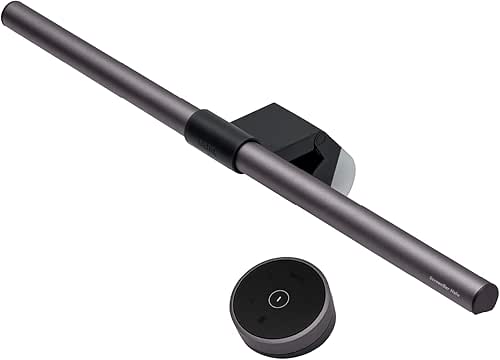
Traditional desk lamps often cause glare on our monitors, which leads to eye strain and headaches. BenQ research shows that proper task lighting can reduce eye strain by 40% [6].
I’ll admit, I was skeptical at first about monitor light bars. I thought my overhead apartment lighting was “good enough.” But during our gray, rainy Austin winters, I noticed I was getting mid-afternoon fatigue. I tried a screenbar that clips to the top of the monitor and casts light downward onto the desk—not the screen. The difference in my focus was immediate.
Micro-Verdict: The single best upgrade for reducing evening eye fatigue without taking up desk space.
Cable Management: The Final Boss of Desk Efficiency
Nothing kills a “zen” workspace faster than tech spaghetti. Use a combination of under-desk cable trays and weighted cable holders on the desktop to keep your charging cords from sliding behind the desk every time you unplug.
The Daily Reset: Sustaining Your System
You can have the best accessories in the world, but if you don’t have the habits to back them up, the clutter will return. In the world of habit stacking, I like to pair my “desk reset” with my end-of-day ritual.
Just like I clean my kitchen counters before I head out for a sunset hike at Barton Creek, I spend five minutes at 5:00 PM clearing my desk. I file any loose papers, wipe down my desk mat, and plug in my mouse for charging. This ensures that when I sit down the next morning with my coffee, I’m greeted by a space that’s ready for work, not a space that’s demanding chores.
—
Conclusion: Investing in Your Space
Building a high-performance desk isn’t about spending thousands of dollars on the latest titanium gadgets. It’s about diagnosing where your friction is—whether that’s a sore lower back, a cluttered surface, or tired eyes—and choosing the right tools to solve it.
Your desk is an investment in your career longevity and your daily well-being. Start with the Ergonomic Triad, find an organization system that fits your “Reach Zone,” and add tech that actually serves your focus.
I’ll see you out on the trails—hopefully with a back that feels a whole lot better than it did yesterday!
Download our 5-Minute Desk Reset Checklist and start your upgrade today.
—
References & Resources
Affiliate disclosure: We may earn a commission on products purchased through our links. This guide is for informational purposes and does not replace professional ergonomic or medical advice.
- McMains, S., & Kastner, S. (2011). Interactions of Top-Down and Bottom-Up Mechanisms in Human Visual Cortex. Journal of Neuroscience (referenced via Journal of Environmental Psychology studies on visual clutter).
- NIOSH (2024). Musculoskeletal Disorders and Workplace Factors. National Institute for Occupational Safety and Health.
- OSHA (2025). Computer Workstations eTool: Components – Monitors. Occupational Safety and Health Administration. https://www.osha.gov/etools/computer-workstations/components/monitors
- Mayo Clinic Staff (2023). Office ergonomics: Your how-to guide. Mayo Clinic.
- NAPO (2025). The Foundations of Professional Organizing and Productivity. National Association of Productivity and Organizing Professionals.
- BenQ Lighting Lab (2024). The Impact of Task Lighting on Visual Fatigue and Work Performance. BenQ Knowledge Center.