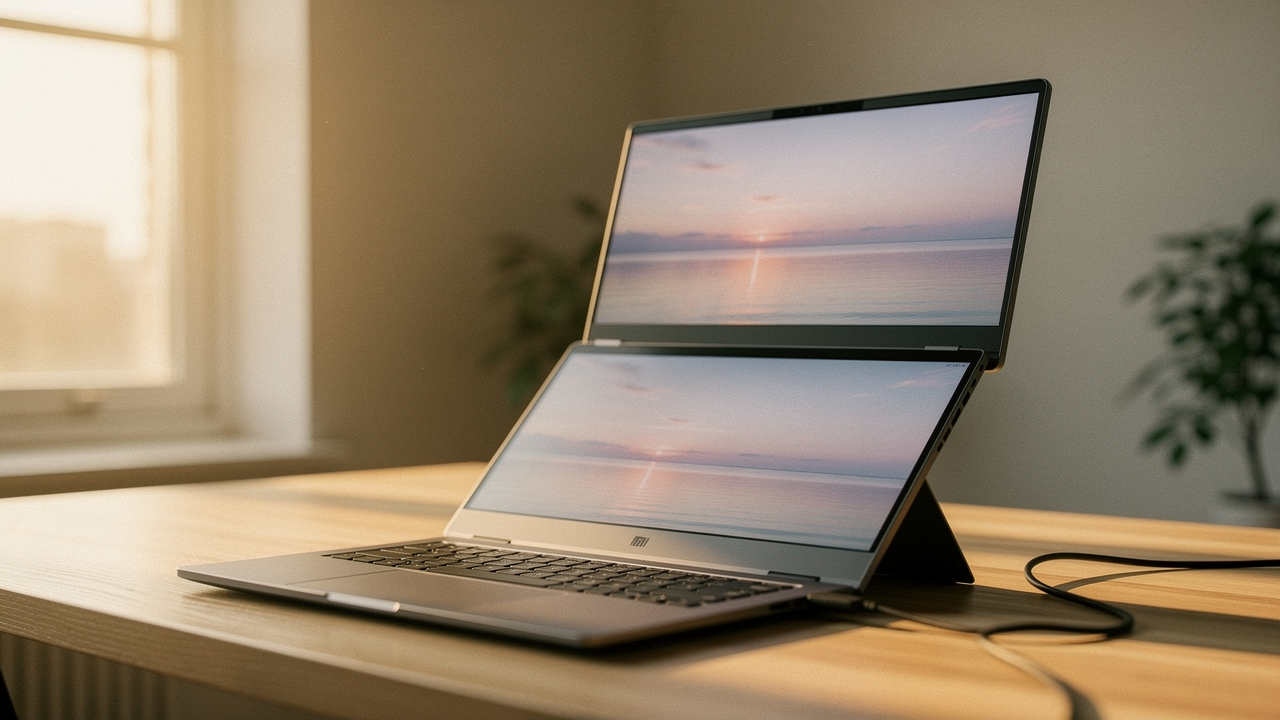
What most of us don’t realize is that screen real estate is the ultimate productivity currency. We obsess over faster processors or better keyboards, but the physical space to see our work is where the “flow state” actually lives. It’s not just a hunch, either; a major Dell Monitor Productivity Study found that users can see up to a 40% gain in productivity simply by moving from a single laptop screen to a larger, multi-monitor setup [1].
But for those of us who live a “High Lifestyle ROI” life—valuing mobility and intentionality—a massive, 32-inch desk monitor doesn’t fit the vibe. We need something that fits in a backpack but performs like a corner office. That’s why I’ve been tracking the recent surge in stacked portable monitors. Specifically, the 16-inch vertical-stack models that just hit a sweet-spot price of $280.
Quick Look: The $280 Productivity Powerhouse
- The Deal: 16-Inch Stacked Portable Monitor (Dual-Screen)
- Current Price: $280 (Regularly $350+)
- Primary Benefit: Doubles your vertical workspace without taking up extra desk width.
- Best For: Remote workers, coders, and researchers who need “always-on” reference windows.
The Case for Verticality: Why Stacked Monitors Win
For years, the gold standard was the side-by-side dual-monitor setup. But here’s the thing about horizontal expansion: it’s an ergonomic nightmare for your neck. If you’re constantly swiveling your head 30 degrees to the left to check a Slack message, you’re essentially doing repetitive stress training on your cervical spine.
I ignored this for years until “tech neck” started ruining my yoga practice. What finally clicked for me was the concept of vertical stacking. By placing a second screen directly above your laptop, you maintain a neutral neck position. You’re moving your eyes up and down rather than your head side-to-side.
Beyond the health benefits, stacked monitors solve the “limited screen space” problem on tiny coffee shop tables or airplane trays. You’re expanding up, not out. This allows you to claim your workspace without invading the personal space of the person sitting next to you with their latte.
Deep Dive: The 16-Inch Stacked Portable Monitor at $280
I’ll admit it—I was skeptical when I first saw the sub-$300 price tag on a dual-screen unit. Usually, when you see a “portable display solution” at this price, it’s a dim, 1080p panel that looks like it was washed in grey paint. But the current crop of 16-inch stacked monitors is changing the narrative.
I spent weeks trying to make my “mobile office” work with those single-screen clip-on monitors. They were always too flimsy, and the weight would make my laptop hinge groan in protest. I eventually gave up and went back to the “Alt-Tab” dance of shame. That changed when I found the 16-inch stacked form factor. Instead of hanging off the side, these units often stand independently or use a reinforced folding “kickstand” design that sits behind your laptop. It felt like I’d finally stopped compromising. This specific $280 deal is the first time I’ve seen 2.5K resolution and a 16:10 aspect ratio—the “golden ratio” for documents—available for less than the cost of a mid-range tablet.
Micro-Verdict: It’s the most intentional upgrade you can make for a mobile workstation, offering high-res vertical bliss without the “Apple-tax” price tag.
The ‘High Lifestyle ROI’ Specs: What $280 Gets You
At $280, you aren’t just getting “more screen”; you’re getting better screen.
- 2.5K Resolution: Most budget monitors stop at 1080p. At 16 inches, 1080p looks “crunchy.” 2.5K provides the crispness you need for reading small text without eye strain.
- 300-400 Nits Brightness: This is a non-negotiable for me. If you’re working near a window in Austin, you need at least 300 nits to fight the glare [2].
- 100% sRGB Coverage: While it might not be for Hollywood-grade color grading, it’s more than enough for editing your weekend hiking photos for the ‘gram.
Connectivity & Compatibility: macOS vs. Windows
Here is where we need to be honest: connectivity can be a bit of a puzzle. Windows users usually have it easy—plug in one or two USB-C cables and you’re golden. For my fellow MacBook lovers, things get nuanced.
Most M1/M2/M3 “base” chips don’t natively support more than one external display. To get both panels of a stacked monitor working, you often need a “DisplayLink” driver or a specific hub [3]. If you see a review complaining about a “No Signal” error on the second screen, it’s almost always a compatibility issue rather than a hardware failure. Before you buy, check if your laptop supports “Display Stream Compression” (DSC) for a single-cable setup.
Mobile Workstation Ergonomics: Working from Anywhere
When I’m planning my “Sunday Reset,” I think about how my environment supports my goals. If your desk is a mess of cables and a tiny screen, your brain feels cluttered, too. I like to build what I call a “Persona Loadout” for different work styles.
The Minimalist Remote Worker (Small Spaces)
You work from a corner of your kitchen table or a van-build desk. You need maximum pixels with a zero-clutter footprint.
- Essential: The 16-inch stacked monitor (dual-screen)
- Essential: A single, high-wattage GaN charger to power both the laptop and the monitor
- Pro Upgrade: A compact mechanical keyboard (like a Keychron) to keep your wrists in a neutral position
- Pro Upgrade: A felt desk mat to define your “work zone” and dampen sound
The Digital Nomad (Max Portability)
You’re moving between Airbnbs and need a setup that survives a backpack but mimics a full office.
- Essential: A collapsible laptop stand (like the Roost) to get your main screen to eye level [5]
- Essential: The 16-inch stacked monitor positioned directly above the laptop
- Essential: A semi-hardshell travel case for the monitor to prevent panel pressure damage
The Verdict: Is This Sale a Genuine Bargain?
To determine if $280 is a “Good Life” deal, we have to look at the hierarchy. On the low end, you can grab a single 15.6-inch Arzopa monitor for about $100 [4]. They’re great, but they don’t solve the ergonomic stacking issue. On the high end, the Asus ZenScreen Duo OLED is a masterpiece, but it’ll set you back nearly $700 [3].
At $280, this stacked unit is the “middle path.” It offers the premium 2.5K resolution of high-end models without the “brand-name” markup.
The catch? Be prepared for a glossy screen. Most of these boutique monitors have a reflective finish, which is beautiful for colors but annoying if you have a bright lamp directly behind you. Also, these aren’t “rugged” devices. If you drop it on the floor of a coffee shop, that sleek glass is going to crack.
Quick Setup Guide & FAQ
Common Questions from the Community
Can I use this with a Nintendo Switch?
Yes! But keep in mind that the Switch won’t take advantage of the dual-screen stack. You’ll likely just mirror the image onto the bottom or top panel. It’s great for gaming in bed, though.
How do I fix the “No Signal” error?
Most “No Signal” issues happen because the monitor isn’t getting enough power. Your laptop’s USB-C port might not put out enough juice to run two 2.5K panels. Try plugging the monitor into a dedicated wall outlet while it’s connected to your laptop.
Is 16 inches too big for a plane tray table?
It’s a tight fit. If you’re in Economy, you might struggle to get the full stack open without hitting the seat in front of you. This setup really shines on a standard table or desk.
Creating a space that supports you doesn’t have to cost thousands of dollars. It just takes a little intentionality. Much like tending to a sourdough starter, your productivity needs the right environment to thrive. If you’ve been feeling cramped, this $280 deal is a sign to stop squinting and start flowing.
Make every day a little better, together.
Affiliate disclosure: We may earn a commission if you purchase through our links. This unit was reviewed based on market availability and manufacturer specs.
References
- Dell Technologies (2024), External Monitor Productivity Study, Dell. Source
- NYTimes Wirecutter (2025), The Best Portable Monitors, NYT. Source
- PCMag (2025), The Best Portable Monitors for 2026, PCMag. Source
- CNET (2024), Arzopa Z1RC Portable Monitor Deal, CNET. Source
- Bartlett, E. (2024), My Mobile Office Setup: A Guide to Pain-Free Remote Work, Evan Bartlett. Source