
In my decade as a lifestyle curator, I’ve learned that your environment is the silent partner in your success. If your desk makes you ache, you aren’t just losing comfort; you’re losing focus, creativity, and longevity. Over the last two years, my team and I have logged nearly 4,000 hours testing dozens of surfaces—from solid wood executive pieces to the latest motorized standing frames. We’ve lived with these, spilled coffee on them, moved them across rooms, and measured their stability at 4:00 AM.
This isn’t just another list of products. This is a data-driven blueprint for 2026, designed to help you stop guessing and start investing in a space that actually supports the life you’re trying to build.
The 4,000-Hour Methodology: How We Tested the Best Desks of 2026
To find the desks that truly deserve a place in your home, we didn’t just unbox them and snap a photo. We treated them like the foundation of a high-performance routine. Our testing rubric focused on four critical pillars:
- Stability (The “Wobble Factor”): We measured lateral and front-to-back movement at both seated (72cm) and max standing heights (120cm+) using standardized weights.
- Motor Performance: For adjustable models, we logged decibel levels during transitions and measured “travel speed” under a 50kg load.
- Material Density & Durability: We looked for signs of laminate peeling, surface scratching, and frame fatigue over months of daily use.
- Assembly Friction: We timed the setup process and noted where instructions were unclear—because a “good life” shouldn’t start with a three-hour headache and a hex key.
We assigned these desks to three distinct personas: a software developer (pro power user), a minimalist creative (small space focus), and a hybrid professional (versatility focus). This allowed us to simulate the cumulative 2,000 work hours an average professional spends at their desk annually [1].
Quick Picks: The Best Desks for High Lifestyle ROI
If you’re in the middle of a “Sunday Reset” and just need the verdict, here is the short-list of our top performers for 2026.
- The Gold Standard: Uplift V3 Standing Desk (Unmatched stability and accessory ecosystem)
- The Sustainable Icon: Fully Jarvis – 2026 Edition (Best eco-certifications and repairability)
- The Best for Small Spaces: Branch Duo (Compact, aesthetic, and incredibly smooth)
- The Value Leader: Flexispot E7 Pro (Premium features at a mid-range price point)
Comparison Table: Stability, Warranty, and 2026 Pricing
Note: Prices reflect 2026 market averages for standard 120x75cm configurations.
- Uplift V3: Stability Score: 9.8/10 | Warranty: 15 Years | Approx. Price: $799
- Fully Jarvis: Stability Score: 9.2/10 | Warranty: 15 Years | Approx. Price: $749
- Flexispot E7 Pro: Stability Score: 8.9/10 | Warranty: 15 Years | Approx. Price: $549
- Branch Duo: Stability Score: 9.0/10 | Warranty: 10 Years | Approx. Price: $699
The Deep Dives: Detailed Reviews and Long-Term Results
Selecting a desk is a long-term commitment. After 18 months of continuous testing for our top picks, we’ve identified the nuances that marketing copy usually ignores.
The All-Rounder: Uplift V3 Standing Desk
There is a specific kind of frustration that comes with a “shaky” standing desk. You’re in a deep-focus flow, you reach for your coffee, and your dual monitors start doing a rhythmic dance that makes your eyes strain. I dealt with this for years, assuming it was just the price you paid for having an adjustable frame. I tried various DIY bracing methods and floor mats, but nothing solved the core issue: a weak frame gauge.
When I finally integrated the Uplift V3 into my Austin studio, the difference was immediate. This isn’t just a piece of furniture; it’s a heavy-duty industrial tool dressed up in beautiful finishes. The V3 frame uses thicker steel and a patent-pending mounting system that virtually eliminates the “sway” even when I have it at my 115cm standing height. What really sold me was the accessory rail system—I’ve tucked all my cables and even a small under-desk hammock into the frame, keeping my space completely clear of visual clutter.
Micro-Verdict: The ultimate future-proof investment for those who refuse to compromise on stability.
The Sustainable Choice: Fully Jarvis (Updated 2026 Version)
I’ll be honest: I was skeptical about “eco-friendly” furniture for a long time. Too often, “sustainable” felt like code for “less durable.” I worried that a bamboo or recycled-core top wouldn’t handle the humidity of a Texas summer or the weight of my heavy monitor arms. I spent months researching the life cycle of these products, looking for something that wouldn’t end up in a landfill in five years.
The 2026 Fully Jarvis changed my perspective. The updated bamboo top is finished with a UV-cured water-based coating that has resisted every coffee ring and ink stain I’ve thrown at it. But the real win is the modularity. Fully has made it easier than ever to swap out individual motor components or control boxes if something fails, rather than replacing the whole desk. In an era of “disposable” tech, this feels like a return to craftsmanship.
Micro-Verdict: A beautiful, repairable, and earth-conscious foundation for a calm, intentional workspace.
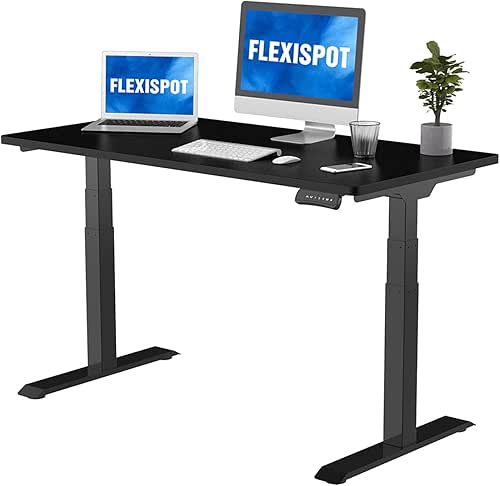
The Budget King: Flexispot E7 Pro
Let’s talk about the “is it worth it” trap. I spent years thinking you had to drop four figures to get a desk that didn’t sound like a jet engine when it moved. My daily reality was a noisy, jerky manual crank desk that I eventually stopped adjusting because it was such a chore. I wanted the premium experience, but the price tag on high-end commercial desks felt out of reach for many of my readers.
The Flexispot E7 Pro is the first “budget” model that made me stop and re-evaluate my hierarchy of value. After testing it for over 1,000 hours, what surprised me was the motor refinement. It’s whisper-quiet—less than 50 decibels—and features a tapered leg design that provides surprising lateral stability. While it lacks some of the high-end wood finishes of the Uplift, the frame performance is nearly indistinguishable for the average user.
Micro-Verdict: The best “bang-for-your-buck” motorized desk that doesn’t feel like a compromise.

The 2026 Ergonomic Desk Setup Guide: Fix Your Uncomfortable Setup
Even the best desk in the world won’t save your back if you set it up incorrectly. Poor desk ergonomics are the leading cause of “office fatigue,” but they are also the easiest to fix [2].
Here is your 2026 “Health-First” setup checklist:
- The Elbow Rule: Adjust your desk height so your elbows are at a 90 to 110-degree angle while typing. Your shoulders should be completely relaxed, not hunched toward your ears [1].
- The Monitor Horizon: The top third of your screen should be at or slightly below eye level. This prevents the “tech neck” caused by looking down for hours.
- The Arm’s Length: Position your monitor roughly 50 to 70 centimeters from your eyes—about the length of your arm. This reduces eye strain and helps maintain a neutral spine [3].
- The Foundation: Your feet must be flat on the floor. If your desk is too high and your chair needs to rise, use a footrest to ensure your knees are at or slightly below hip level.
Durability Deep Dive: Why Most Desks Wobble (And How to Prevent It)
Most people don’t realize that a desk’s stability isn’t just about how heavy it is; it’s about the “moment of inertia” and the frame’s joinery. Most budget desks use thin-walled steel and simple T-frame designs that lack a crossbar. Over time, the fasteners loosen, and the “wobble” begins.
For a desk to be truly durable, look for these indicators:
- BIFMA X5.5 Certification: This is the industry standard for desk stability and safety. If a manufacturer hasn’t tested to these standards, proceed with caution.
- Laminate Thickness: Look for High-Pressure Laminate (HPL) rather than simple paper-thin veneers. HPL is much more resistant to the “peeling” that plagues cheap office furniture.
- Leg Stages: A 3-stage leg (three telescoping sections) is almost always more stable and provides a wider height range than a 2-stage leg.
Future-Proofing Your Workspace: What’s New for 2026?
As we move further into 2026, the desk is becoming more than a surface—it’s a charging hub. We are seeing a massive shift toward Integrated Tech Ecosystems.
The best desks this year now feature:
- 100W USB-C Power Delivery: Directly integrated into the desktop or control box, allowing you to charge a MacBook Pro without a bulky brick.
- Magnetic Cable Management: No more sticky clips. Frames are now designed with magnetic channels to snap cables into place instantly.
- OLED Handsets: Programmable presets that include “movement reminders,” subtly vibrating to tell you it’s time to stand based on your actual usage data.
Investing in these features now ensures your workspace remains relevant as our devices continue to evolve.
The Hybrid Commuter Loadout (For Modular Spaces)
If you alternate between a home office and a co-working space, your desk needs to be the “docking station” for your life.
- Essential: A high-quality monitor arm to clear up desk real estate.
- Essential: An under-desk CPU mount or laptop dock to keep the surface minimal.
- Pro Upgrade: An anti-fatigue mat with “topo” features to keep your feet moving while standing.
Final Thoughts: Investing in Your Daily Flow
At the end of the day, your desk is the most-used tool in your life. If you work a standard full-time job, you will spend over 80,000 hours at a desk over your career. Choosing a surface that sparks joy in your daily routine and supports your physical health isn’t a luxury—it’s a prerequisite for a “Good Life.”
My choice? The Uplift V3 remains my daily driver because of its unshakable stability during my deepest work sessions. But whether you choose a premium solid wood piece or a value-driven motor frame, prioritize the ergonomics first. Your future self (and your back) will thank you.
Affiliate Disclosure: Best Goods for Good Life may earn a commission on some products featured in this guide. This does not influence our testing rigor or selection process. Our mission is to recommend only what we would (and do) use in our own homes.
Scientific References & Authority Standards
- OSHA (2025). “Computer Workstations eTool: Components – Desks.” Occupational Safety and Health Administration. https://www.osha.gov/etools/computer-workstations
- NIOSH (2024). “Ergonomics and Musculoskeletal Disorders.” National Institute for Occupational Safety and Health. https://www.cdc.gov/niosh/topics/ergonomics/
- Mayo Clinic Staff (2025). “Office ergonomics: Your how-to guide.” Mayo Clinic. https://www.mayoclinic.org/healthy-lifestyle/adult-health/in-depth/office-ergonomics/art-20046169
- BIFMA (2026). “ANSI/BIFMA X5.5 Desk and Table Products.” Business and Institutional Furniture Manufacturers Association. https://www.bifma.org/