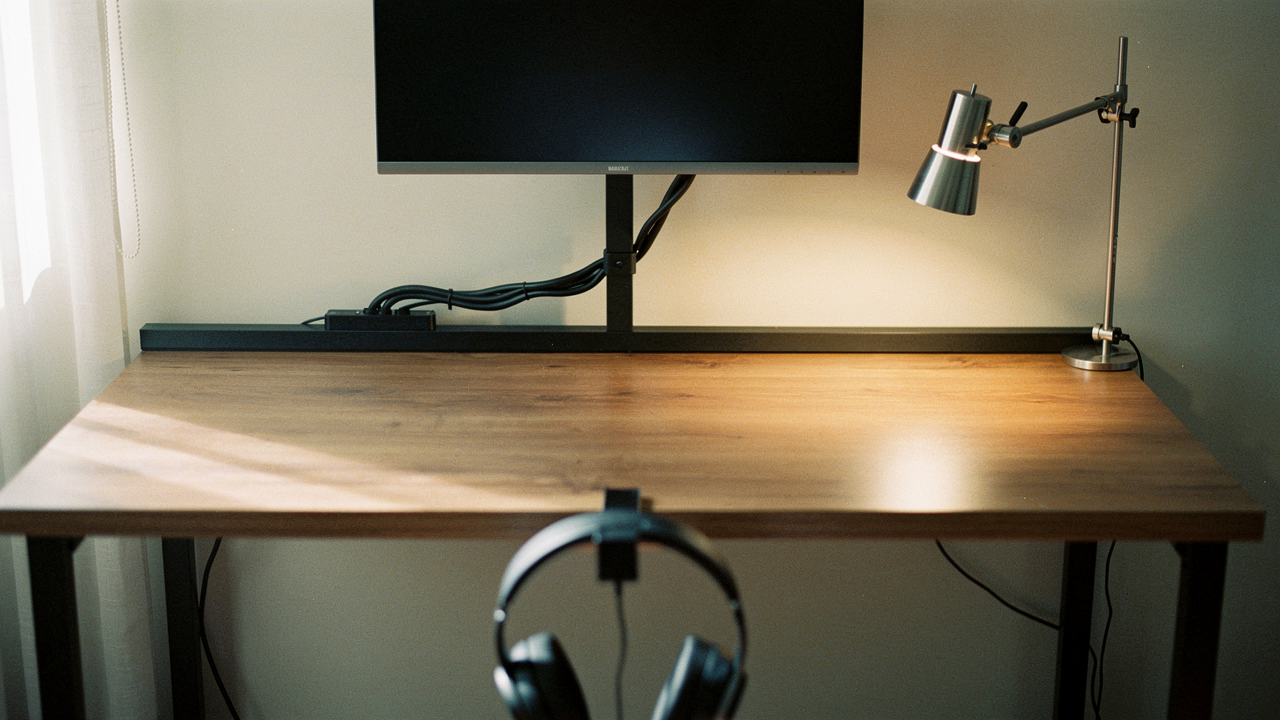
It wasn’t always like this. For years, I lived the “organized chaos” lie. My desk was a graveyard of tangled USB cables, a bulky monitor stand that took up a third of my workspace, and a headphone set that lived wherever it happened to land. I tried the pretty acrylic trays and the drawer dividers, but within three days, the clutter would creep back like weeds in a garden.
The breakthrough came when I realized I was fighting a losing battle against gravity. Most “desk organization” involves moving things around on a 2D plane. But the real secret to a High Lifestyle ROI workspace is reclaiming that third dimension.
By clamping every possible accessory to the edges of my desk, I’ve turned my workspace into a “floating” command center. No more moving things to clean; no more visual noise. Just space to breathe and create. This system requires zero drilling, saves your expensive furniture, and—as I found out through quite a bit of research—is actually backed by how our brains process information.
The Invisible Cost of the ‘Messy Desk’ Tax
Let me be honest: a messy desk isn’t just an aesthetic problem. It’s a cognitive drain. I used to think I was just “not a morning person,” but the reality was that every time I sat down to work, my brain was already exhausted from processing the piles around me.
There is a literal “Visual Tax” on your focus. Research from the Princeton University Neuroscience Institute has shown that multiple stimuli present in the visual field at the same time compete for neural representation [1]. Essentially, your brain is constantly “noticing” that tangled charger or that stack of mail, which leaves less processing power for your actual work.
The impact is more than just a feeling. According to a DeskTime survey, roughly 90% of office workers believe that a cluttered workspace negatively impacts their mood and productivity [2]. When your environment is chaotic, your brain stays in a mild state of “high alert,” making it harder to drop into that deep-flow state we all crave.
Why ‘Clearing Your Desk’ Isn’t Enough
We’ve all done the “big Sunday reset” where we clear everything off, only for the mess to return by Wednesday. Here’s the thing: clearing your desk is a temporary fix for a structural problem.
Standard desk accessories—lamp bases, monitor stands, charging hubs—are designed to sit on top of the surface. They have a “footprint.” When you have ten items with footprints, you’ve lost half your desk before you’ve even opened your laptop. A hardware-first system, specifically one built on clamps, removes the “footprint” problem entirely. If it doesn’t have a home off the surface, it shouldn’t be on the desk.
The ‘Clamp-First’ Philosophy: Reclaiming Your Surface Area
My philosophy at “Best Goods for Good Life” is simple: when your environment supports you, everything flows better. I call this the “Accessory Map Method.”
I divide my gear into two categories:
- Input Gear: Things I touch constantly (keyboard, mouse, notepad). These stay on the desk.
- Infrastructure Gear: Things that just need to “be there” (monitor, light, mic, cables, power strips). These get clamped.
By moving the infrastructure gear to the edges, I maximize the High Lifestyle ROI of my desk. I’m not paying for a 60-inch desk just to use 20 inches of it. I want the whole surface available for my sourdough recipes, my journaling, or just the luxury of a clear space to think.
The Hardware: Understanding Desk Clamps and Mounts
I’ll admit it—I was skeptical at first about whether clamps would actually hold up. I didn’t want my expensive ultrawide monitor crashing down because of a cheap piece of metal. But after diving into the technical specs, I realized that high-quality clamps are often more stable than the stands they replace.
The most common mounting method is the C-Clamp. It’s the gold standard for most desks because it has a low under-desk profile, which is crucial if you have a sit-stand desk with a motor or a cable tray in the way. For context, heavy-duty C-clamps from brands like Atdec are often rated to support up to 35 lbs [3].
C-Clamps vs. F-Clamps: Which One for Your Desk?
Not all desk edges are created equal. If you have a standard flat edge, a C-clamp is your best friend. However, if your desk has a significant “lip” or an overhang, you might need an F-clamp. F-clamps have a sliding arm that allows them to reach further under the desk, providing a more secure grip on non-standard frames.
Before you buy, grab a tape measure. Most standard clamps are designed for desk thicknesses between 0.4 and 2.5 inches [4]. If you’re using a thin glass top or a hollow-core desk (like the IKEA Linnmon), you’ll need to be extra careful—but we’ll get to those troubleshooting tips in a moment.
The 5 Essentials You Should Clamp Right Now
Ready to reclaim your space? These are the five items that made the biggest difference in my Austin home office.
1. The Monitor Arm: Your #1 Space Saver
Let’s talk about that giant plastic stand that came with your monitor. It’s a space hog. I ignored this for years, thinking a monitor arm was just for “hardcore gamers.” I was so wrong. Moving my screen onto a VESA-compatible arm was like adding six inches of depth to my desk instantly.
The real win here is the ergonomics. Instead of slouching to meet your screen, you can bring the screen to your eye level. Most quality arms allow for tilt, swivel, and height adjustment, which is a lifesaver for your neck during those 8-hour workdays.
Micro-Verdict: The ultimate tool for instant desk real estate and neck relief.
2. Under-Desk Cable Trays (No More Spaghetti)
We’ve all tried those adhesive cable clips that inevitably peel off after three months, leaving a sticky residue and a mess of wires. I finally gave up on adhesives and switched to a clamp-on metal tray.
Unlike the “taco” style trays that require drilling, a clamp-on tray holds your power strips and “cable bricks” securely beneath the surface. It’s a game-changer for sit-stand desks where cables need to move with the desk without getting snagged.
Micro-Verdict: Professional-grade cable hygiene without putting a single hole in your furniture.
3. Clamped Power Strips and USB Hubs
Diving under the desk to plug in a charger is a ritual I am happy to leave in the past. I found that clamping my power strip directly to the edge of the desk—facing inward or outward—transformed my workflow.
I chose a model that includes both standard AC outlets and fast-charging USB-C ports. Now, when I need to charge my camera or plug in a ring light for a call, the port is right there. It turns your desk edge into a functional power hub.
Micro-Verdict: Puts your power exactly where you need it, ending the “under-desk dive” forever.
4. Headphone Hooks and Cup Holders
I used to be a minimalist who thought “I don’t need a special hook for my headphones.” Then I realized my headphones were taking up a 7-inch circle of space on my desk every single day.
A simple dual-clamp hook allows me to hang my noise-canceling headphones and my workout earbuds out of sight but within arm’s reach. Some even come with a built-in cup holder. If you’ve ever spilled coffee on a mechanical keyboard (guilty!), you know that moving the liquid off the desk surface is a high-ROI move.
Micro-Verdict: Small wins that solve “accessory disorganization” for the price of a few lattes.
5. Clamped Shelving and Pegboards
When you run out of horizontal space, you go vertical. I recently added a small clamp-on pegboard to the side of my desk. It’s where I keep my favorite pens, my sourdough timer, and a small plant.
The beauty of these is that they provide a “backsplash” for your desk without the need for a wall. If you work in the middle of a room or a studio apartment, this creates a sense of “enclosure” and privacy that helps with focus.
Micro-Verdict: Creates vertical storage and a “private office” feel on any tabletop.
Troubleshooting the ‘Tricky’ Desk
“But Jordan,” you might say, “my desk has a weird beveled edge!” or “I’m working on a glass table!” Don’t worry—I’ve been there.
Here is how to handle the tricky setups:
- Beveled or Curved Edges: If your clamp is slipping, the r/Ergonomics community recommends using a “shim.” A small piece of non-slip rubber or even a thin wooden block can level out the clamping surface and provide the friction needed to stay put [5].
- Glass Tops: Never clamp directly to glass. The pressure can cause it to shatter. If you must, use a “monitor mount reinforcement plate” to spread the pressure over a larger surface area.
- Hollow-Core Desks (IKEA Linnmon/Lagkapten): These are essentially cardboard honeycombs inside. If you over-tighten a heavy monitor arm, you will crush the desk. Use a wide wooden block (like a piece of 1×4) on both the top and bottom of the clamp to distribute the weight.
- Damage Prevention: Always check if your clamp has rubber padding. If it doesn’t, a simple piece of felt or a scrap of leather will protect your desk from scratches.
Maintaining the System: The Daily Reset
Clamps are a tool, not a miracle. Even with everything floating, a desk can still get messy if you don’t have a habit to support it.
I follow what I call my “Sourdough & Setup” routine. Every morning, while my coffee is brewing and I’m checking on my sourdough starter, I do a 2-minute desk reset. I put my pens back on the pegboard, hang my headphones, and clear any stray papers.
Organization experts like Erin Condren suggest that these “micro-tidies” are more effective than a monthly deep clean because they prevent the “clutter overwhelm” from ever starting [6]. Because my desk surface is clear, this reset takes seconds, not hours.
Reclaiming Your Flow
At the end of the day, a clutter-free desk isn’t about looking “minimalist” for Instagram. It’s about creating a space that doesn’t ask anything of you. When you sit down and see a wide, open surface, your brain receives a signal that it’s okay to focus, to create, and to breathe.
If you’re feeling overwhelmed by your workspace, don’t try to fix it all at once. Start with just one clamp—maybe a monitor arm or a headphone hook. Feel the difference that a few square inches of reclaimed space makes. I bet you’ll be looking for your next clamp before the week is over.
Stay intentional, and let’s make every day a little better, together.
Affiliate disclosure: We may earn a commission on products purchased through our links at no extra cost to you. This does not influence our editorial integrity. We only recommend products we have researched, tested, or genuinely believe provide High Lifestyle ROI.
References & Resources
Scientific Studies
- Princeton University Neuroscience Institute. “Visual clutter and its impact on neural representation and focus.” Journal of Neuroscience Research.
- DeskTime Survey (2019). “The impact of workspace clutter on office worker productivity and mood.”
- IJRPR Journal. “Clean and Organized Desk Helps Improve Your Productivity.” Vol 4, Issue 4.
Technical Specifications
- Atdec Mounting Guidelines. “Load capacities for C-clamp vs Bolt-through mounting systems.”
- Raxmount Installation Manual. “Torque specifications and safety benchmarks for desk accessory mounting.”
- Erin Condren Organization Guide. “The link between clutter, procrastination, and productivity maintenance.”