
=
Think of your desk organization like a sourdough starter. It requires a bit of thoughtful, upfront effort, but once you have a system in place, it feeds your productivity every single day. That’s what I call High Lifestyle ROI. Today, I’m skipping the generic “buy some zip ties” advice. Instead, I’m sharing a professional systems-based blueprint to help you transition from cable chaos to a workspace that actually supports your best work. We’re going to audit, plan, and execute a setup that’s as safe as it is beautiful.
The Psychology of Cable Chaos: Why Management Matters
It’s easy to dismiss messy cables as a “later” problem, but the environment we work in dictates the quality of our output. Research from the Human Factors and Ergonomics Society (HFES) suggests that visual clutter competes for our attention, increasing cognitive load and making it harder to focus on complex tasks [8]. When your workspace is clear, your mind follows suit.
Beyond the mental weight, there’s a very real physical risk. According to OSHA guidance, tripping over unsecured cords is one of the leading causes of office-related injuries [7]. In a home office, where we often walk around barefoot or in socks, a stray loop of wire isn’t just a mess—it’s a hazard. Managing your wires is the ultimate act of self-care for your space; it protects your gear, your safety, and your sanity [1].
Phase 1: The “Systems Thinking” Audit
Before you even think about opening a tab to buy organizers, you need a plan. Most people buy a bag of clips, stick them randomly under the desk, and wonder why it still looks like a disaster two weeks later.
I learned the hard way that you have to “triage” your devices first. Start by unplugging everything. Yes, everything. Group your cables into two categories:
- Permanent: Your monitor power, computer power, and dock. These should be routed as invisibly as possible.
- Transient: Your phone charger, camera battery lead, or peripheral cables. These need to be accessible but tidy.
As you plan your routes, remember a key tip from IT pros: keep your low-voltage signal cables (like HDMI and USB) slightly separated from your mains power cords (the thick 120V ones) when possible. This prevents signal interference and keeps your data flowing at top speeds [3].
The Cable Management Toolkit: Essentials vs. Overkill
In my Austin studio, I’ve tested dozens of “hacks,” but I’ve found that high-quality, reusable tools are always the better investment. Skip the single-use plastic zip ties—they’re a nightmare to adjust and can actually pinch and damage cable insulation if they’re pulled too tight [3].
I’ll admit it—I was skeptical about spending more than ten dollars on a tray. I used to think a few adhesive hooks would do the trick. But after the third time an adhesive failed in the middle of a Zoom call, sending my power strip crashing to the floor, I went looking for a real solution. I wanted something that felt like it was part of the desk, not an afterthought. That’s when I found a mesh-style basket that completely changed the game. It hides the bulky “power bricks” that usually ruin the look of a clean setup, but because it’s mesh, it allows for plenty of airflow so nothing gets too hot.
Micro-Verdict: The ultimate solution for hiding bulky power bricks without risking overheating.


If you’re working with a more traditional desk or a tighter budget, you still need a backbone for your system. Here’s the thing about under-desk organization: the goal is to get everything off the floor. I tried resting my power strips on the crossbars of my desk, but they just slid around. A simple, sturdy steel tray that screws into the underside of your desktop creates a permanent home for your “power hub.” It’s the single biggest win for any desk setup [1].
Micro-Verdict: A durable, no-nonsense way to lift your power strip off the floor and out of sight.
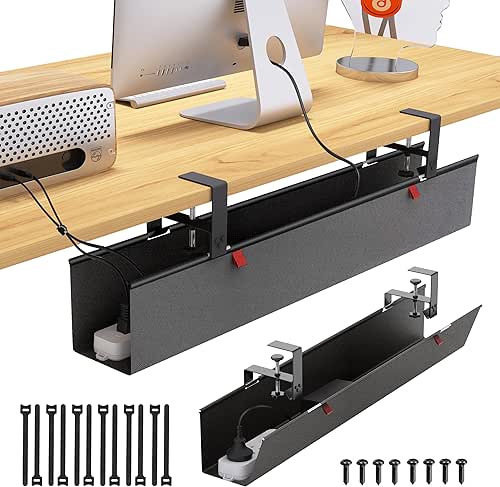
For the actual bundling, I’ve become a total convert to “soft” solutions. I ignored these for years, thinking they weren’t “strong” enough, but they are so much kinder to your wires. You want something you can undo in five seconds when you get a new keyboard or move your monitor.
Micro-Verdict: The gold standard for bundling cables without the risk of damaging insulation.

Phase 2: Blueprints for Common Desk Layouts
Every desk has its own personality—and its own unique cable problems. Here is how I approach the two most common “pain point” setups.
The Standing Desk: Managing the Travel Range
Standing desks are wonderful for your back, but they are the ultimate test of cable management. If you don’t account for the “dynamic slack,” you’ll eventually raise your desk only to hear the sickening *pop* of a monitor cable snapping.
The rule of thumb here is to ensure you have 30–36 inches of vertical slack for any cord traveling from the floor to the desk [4]. I recommend grouping all these “traveling” cables into a single braided sleeve. This way, instead of five wires dangling, you have one neat “umbilical cord” that moves gracefully as the desk rises.
The Floating Desk: Aesthetics First
If your desk is in the center of the room or “floating” away from a wall, you can’t just hide the mess against the baseboards. This is where you have to get creative with architecture. I’ve seen some brilliant setups using rug slits to route power from a floor outlet directly up a desk leg [2]. If you have to run a wire across the floor, use a low-profile, weighted raceway that matches your flooring. It turns a trip hazard into a design element.
Step-by-Step: Executing the Clean Setup
Ready to dive in? This is your 60-minute transformation workflow.
Step 1: Mount the Power Strip Off the Floor
This is non-negotiable. Whether you use a tray or high-strength mounting tape, getting that power strip off the floor is 90% of the battle. It makes cleaning easier and instantly clears the visual “noise” from under your feet.
Step 2: Bundle and Label
As you route your wires into your tray or sleeves, label them. I use simple Kableflags or even a bit of masking tape near the plug. You’ll thank me in six months when you need to swap out a printer and don’t have to play “cable detective” under your desk.
The Pro Details
When you’re bundling, keep the “bend radius” in mind. For Ethernet cables, you want to avoid sharp 90-degree kinks; try to maintain a curve that is at least four times the diameter of the cable to ensure your internet speeds don’t drop [8]. Also, don’t overstuff your trays. Professional standards warn against “overcrowding” power wires, as they need a little breathing room to dissipate heat [8].
Suggested Loadouts per Persona
The Minimalist Remote Worker (Small Spaces)
You work from a corner of your living room and need the “disappearing” act.
- Essential: A high-quality tech pouch for your daily chargers
- Essential: Adhesive cable clips for the edge of your desk to keep phone cords from falling
- Pro Upgrade: A magnetic cable dock for your desktop to anchor your most-used leads
The Power User (Dual Monitors + Peripherals)
You have a lot of gear and need a robust system that can grow with you.
- Essential: A large, screw-in under-desk cable tray
- Essential: A 100-pack of reusable hook-and-loop ties
- Essential: Braided cable sleeves to consolidate monitor runs
- Pro Upgrade: A dedicated label maker for cord identification
Troubleshooting and Long-Term Maintenance
Here’s the honest truth: cable management isn’t a “one and done” task. Adhesive clips eventually lose their stickiness, especially in humid climates or on textured surfaces. If a clip fails, I usually replace it with a small screw-in clamp for a permanent fix.
I also recommend a “Sunday Reset” for your tech about every six months. Take a peek under the desk. Is there dust buildup? Dust is the enemy of tech longevity and can actually be a fire hazard in high-voltage areas [8]. Give everything a quick wipe and check for any tight bends or loose connections.
Living well is about the details. When you sit down at a desk where every wire has a home, you’re telling yourself that your work—and your focus—is worth the effort.
Ready to optimize the rest of your home office? Check out our guide to ergonomic lighting.
**Affiliate disclosure:** We may earn a commission on products purchased through our links.
**Safety Note:** Always consult a licensed electrician for fixed-wall wiring or electrical panel modifications. Never “daisy-chain” multiple power strips together, as this can lead to fire hazards.
References
- Branch Furniture. (2024). Office Safety and Cable Management Hazards. https://www.branchfurniture.com/blogs/turn-key/cable-management-ideas
- Chris Loves Julia. (2023). How to Hide Wires for a Floating Desk.
- Data Doctors. (2025). Tips for Organizing Computer Cables. https://wtop.com/tech/2025/01/column-tips-for-organizing-messy-computer-cables/
- Desky. (2024). Standing Desk Cable Management Requirements. https://desky.com/blogs/news/how-to-organise-cables-under-desk
- Humanscale. (2023). NeatTech Engineering & Design Rationale.
- NYMag Strategist. (2024). Best Cable Organizers (Editorial Review). https://nymag.com/strategist/article/best-cable-organizers.html
- OSHA. (2023). Workplace Safety Guidelines for Trip Hazards.
- TSCables. (2024). Thermal Management and Wire Bundling Standards. https://tscables.com/blogs/news/how-to-avoid-tangled-wires-in-network-cabling