It was a total vibe-killer.
As someone who obsesses over “High Lifestyle ROI,” I believe our homes should work for us, not demand our attention with obtrusive designs. We want the convenience of a smart home—the automated lights that dim when we start a movie and the speakers that fill the room with jazz on Sunday mornings—but we don’t want our living rooms to look like a Best Buy showroom.
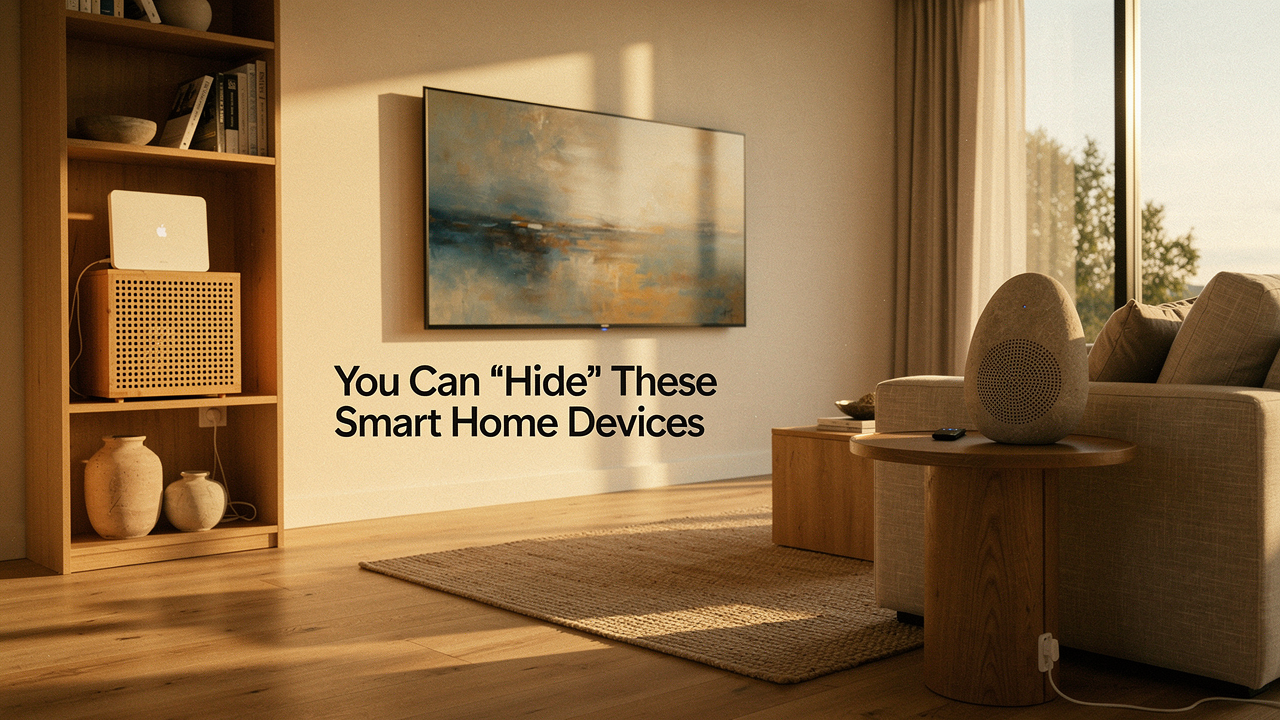
The good news? You don’t have to choose between a “dumb” beautiful home and a “smart” cluttered one. The secret lies in the Stealth Smart Home philosophy: a way of integrating technology so deeply into your decor that the tool disappears, but the benefit remains.
Quick Guide: The Stealth Tech Strategy
If you’re looking for the “too long; didn’t read” version of making your tech invisible, here is the blueprint:
- Conceal the Brains: Use ventilated decorative boxes or rattan baskets for routers and hubs.
- Camouflage the Screens: Opt for “Art TVs” that display paintings when not in use.
- Double-Duty Furniture: Choose speakers that are literally built into lamps or picture frames.
- Go Invisible with Infrastructure: Use in-wall modules behind your existing “pretty” light switches instead of using bulky smart bulbs.
The Design Conflict: Why Your Smart Home Doesn’t Have to Look ‘Techy’
Here’s the thing about “smart home decor”—it’s often an oxymoron. Most gadgets are designed by engineers, not interior stylists. This leads to what I call “visual noise,” where your brain can’t fully relax because it’s constantly processing the blinking lights and glossy black plastics of your gadgets [1].
True optimization is when the technology recedes. When I talk about High Lifestyle ROI, I’m talking about the peace of mind you get from a space that feels calm and cohesive. Tech clutter in home decor isn’t just an eyesore; research into environmental psychology suggests that visual clutter can actually increase cortisol levels, making it harder to unwind after a long day at the office [2].
My rule of thumb? If a device doesn’t spark joy or serve a literal aesthetic purpose, it needs to be “stealthed.” Whether that means hiding it entirely or choosing a version that masquerades as something else, the goal is to keep the focus on your style, not your silicon.
The Infrastructure Audit: Hiding Routers, Hubs, and Modems
We’ve all been there: staring at that bulky, plastic “spider” of a router with its six antennas, wondering why it has to be the centerpiece of the entryway. Routers and hubs are the most common culprits of obtrusive smart device design. They’re essential for your home’s “nervous system,” but they are rarely pretty.
For the longest time, I tried to shove mine behind a heavy velvet curtain, only to realize I’d essentially killed my Wi-Fi signal in the bedroom. I’ve tried the “stack of books” trick too, but that led to a very hot router and a very worried Jordan. What I eventually discovered is that you can absolutely hide these “brains” as long as you respect two things: signal transparency and airflow.
The Golden Rule of Ventilation: Safety First
Before you tuck any powered device into a drawer or box, you have to think about heat. According to safety standards from UL (Underwriters Laboratories), enclosing electronics without proper ventilation is a leading cause of device failure and, in extreme cases, fire hazards [3].
When choosing a “hiding spot,” look for materials like rattan, cane, or laser-cut wood. These “breathable” materials allow heat to escape while letting Wi-Fi signals pass through relatively unimpeded.
I struggled with a messy pile of black boxes on my media console for years before I finally found a solution that didn’t look like a “tech solution.” I wanted something that looked like it belonged in a curated home, not a server room. I tried a few solid wooden boxes first, but my router started dropping the signal because the wood was too dense. Finally, I switched to a ventilated, minimalist box designed specifically for cable management and hub concealment. It changed everything—suddenly, my console looked like a styled vignette rather than a disaster zone.
The real win here: It turns a “tech eyesore” into a clean, intentional design element without sacrificing a single bar of Wi-Fi.


Invisible Audio and Displays: Tech as Art
One of the biggest “black holes” in home design is the television. When it’s off, it’s just a giant, dark rectangle that sucks the life out of a room. The same goes for bulky smart speakers that take up valuable real estate on your side tables.
To create a stealthy smart home setup, we need to look for “chameleon” products. These are items designed by brands that actually understand interior design—think Sonos, IKEA, and Samsung. They’ve moved toward a philosophy of “ambient intelligence,” where the tech is only visible when it’s doing something for you.
Let let me be honest: I used to hate having speakers in every room. They always felt like “dust collectors” that clashed with my neutral, minimalist aesthetic. But then I saw how audio could be integrated into light. I started experimenting with pieces that serve two functions. By replacing my bedside lamp with a speaker-integrated model, I cleared up my nightstand clutter and gained high-fidelity sound that feels like it’s coming from the air itself, not a gadget.
What sold me: The ability to have a “no-gadget” look while still enjoying a premium multi-room audio experience.
For the living room, the ultimate “stealth” move is the Art TV. If you’re a minimalist who hates that “black mirror” look on your wall, this is the solution. I’ve helped several clients in Austin integrate these into gallery walls, and guests literally cannot tell it’s a TV until it’s turned on.
The game-changer: It replaces a 55-inch void with a high-resolution van Gogh or a custom family portrait.

Subtle Home Automation: Sensors and Switches That Disappear
The “old way” of doing smart homes involved sticking tablets on every wall. But the subtle home automation movement—often called “Calm Technology”—argues that tech should work in the background without requiring a screen [4].
The Rise of In-Wall Modules
Instead of buying smart bulbs that require you to keep your light switches “on” all the time (and often look a bit “off” in high-end fixtures), I recommend smart relays or modules. These are small devices that an electrician (or a very handy DIYer) can install behind your existing, beautiful designer switches.
This allows you to keep your brass toggles or vintage-style dimmers while gaining the ability to automate them via your phone or voice. It’s the ultimate way to integrate devices into decor because the “smart” part is literally invisible.
- The Power User: Use Lutron Caseta switches for rock-solid reliability in larger homes.
- The Minimalist: Use Aqara or Shelly modules behind your current switch plates.
- The “Invisible” Sensor: Place motion sensors underneath furniture (like a bed or sofa) so they catch your feet hitting the floor at night without being seen on the wall.
Renter-Friendly Stealth: No-Drill Concealment
I know not everyone can go tearing into their walls to install hidden modules. If you’re renting, you have to get creative with how you camouflage smart home tech.
The biggest “tell” of a smart home is the wires. Gravity is the enemy of a clean aesthetic. To fix this, I rely heavily on adhesive cord channels that can be painted to match your walls. I also love using “skins”—basically high-quality vinyl wraps—for things like the Amazon Echo or Google Nest. You can get skins in wood grain, marble, or even fabric textures that help the device blend into your bookshelf.
Persona Loadout: The Renter’s Stealth Kit
- Essential: Paintable J-channel cable organizers for running cords along baseboards.
- Essential: Fabric “socks” or skins for smart speakers to match your upholstery.
- Pro Upgrade: A hollow “faux book” set to hide a small hub or bridge on a bookshelf.
Testing Your Stealth: Performance vs. Aesthetics
Before you declare your project finished, you need to perform what I call the “Jordan Miller Audit.” It’s easy to make a home look beautiful, but it’s a waste of “Lifestyle ROI” if the tech stops working.
Once you’ve hidden your devices, you need to check:
- Wi-Fi Strength: Use a free app like Ubiquiti’s WiFiman to walk around your room. If you see a “dead zone” where you’ve hidden your router, you might need to swap your enclosure for a thinner material like rattan [5].
- Microphone Sensitivity: If you use voice assistants, try giving commands from across the room. If the device is inside a cabinet, it might struggle to hear its “wake word.”
- The Heat Test: After your devices have been running for two hours, feel the enclosure. It should be room temperature. If it feels hot to the touch, you need more ventilation holes.
Creating a Home That Supports You
At the end of the day, a “Good Life” isn’t about having the flashiest gadgets; it’s about creating a space that feels like a sanctuary. When we hide the “seams” of our smart home, we allow ourselves to enjoy the convenience without the constant reminder of the digital world.
Try doing a “visual tech audit” this weekend. Look at your space with fresh eyes—where is the tech shouting? Where could it be whispering? Start with one small change, like hiding a router or cable-managing your nightstand, and feel how the energy of the room shifts.
Let’s make our homes smarter, but let’s make them more “us” first.
References & Research
Disclaimers: This article contains affiliate links for products I personally use and recommend. Always consult a licensed electrician for in-wall hardware installations. Ensure all enclosed electronics have adequate ventilation as per manufacturer guidelines to prevent fire risk.
- Signify (Philips Hue), 2024. The Impact of Lighting Design on Home Wellness. https://www.philips-hue.com
- Environmental Psychology Journal, 2023. Visual Clutter and Cortisol: The Impact of Domestic Environments on Stress.
- UL Solutions, 2025. Standard for Safety of Information Technology Equipment: Ventilation Requirements. https://www.ul.com
- Amber Case, 2015. Calm Technology: Principles and Patterns for Non-Intrusive Design.
- Ubiquiti Inc., 2026. WiFiman: Understanding Signal Attenuation in Home Environments. https://www.ui.com
- CEDIA, 2024. The Designer’s Guide to Integrated Home Technology. https://cedia.org