
=
I realized then that my “intentional space” had a dark, knotty secret.
Living a high-lifestyle-ROI life isn’t just about the pretty linen sheets or the perfect sourdough starter; it’s about removing the friction that slows us down. Every time you dig through a messy cable box, you’re losing mental energy. Today, we’re going to fix that. We’re moving through a full tech purge, from the “box of shame” to the wires currently dangling under your desk, using a system that’s safe, sustainable, and—dare I say—actually a little bit of a Sunday reset ritual.
The Hidden Cost of Tech Clutter: Why It Matters
Here’s the thing about unused tech clutter: it’s rarely just an aesthetic problem. We often look at a pile of wires and think, “I’ll get to that eventually,” but the weight of that unfinished task actually adds to our daily stress. Beyond the mental load, there’s a very real safety component that we can’t ignore.
The National Fire Protection Association (NFPA) reminds us that home office equipment and the associated “octopus” of power strips can become significant fire hazards if not managed correctly [2]. When cables are crushed behind heavy furniture or tangled in a way that traps heat, the insulation can degrade. The Consumer Product Safety Commission (CPSC) frequently warns about the risks of overloaded power strips and frayed cords, which are leading causes of residential electrical fires [1].
When we ignore our cable chaos, we aren’t just being “messy”—we’re potentially compromising the safety of our homes. Reclaiming your space is about creating a environment where your tech supports your life, rather than creating a hazard beneath your feet.
The 5-Step Cable Triage System
What finally clicked for me was realizing I didn’t need to keep every cable “just in case.” Most of what we’re hoarding is actually obsolete. To conquer the mountain, we need a decisive workflow.
Step 1: The Great Unload
I want you to take every “random box” and “junk drawer” and dump them onto a clear surface—like your dining table or a clean rug. Seeing the sheer volume of electronic cables you own is the only way to realize how much you *don’t* actually use. It’s a bit of a “shock to the system” moment, but it’s necessary.
Step 2: The Identification Phase
This is where people usually get stuck. You pick up a wire and think, “What does this even go to?”
- The Legacy Pile: These are your Micro-USB (trapezoid shape) and Mini-USB (thick, chunky) cables. Unless you have an old Kindle or a specific camera, these are largely being phased out.
- The Modern Standards: USB-C is the current gold standard for almost everything. If it’s high-quality and USB-C, it’s a keeper.
- The Video Cables: If you see an HDMI cable, check the markings. The HDMI Licensing Administrator notes that cables marked “High Speed” (1.4) are fine for basic HD, but you’ll want “Ultra High Speed” (2.1) for modern 4K or 8K setups. Anything older than 1.4 can likely be tossed.
Step 3: The ‘Rule of Two’ (Keep, Sell, Recycle)
My personal rule for a high-ROI lifestyle is simple: Keep two high-quality versions of every standard cable (USB-C, Lightning), one legacy cable (like a single Micro-USB for that one old label maker), and purge the rest. You do not need twelve identical black power bricks. I promise.
The Tech Purge Playbook: Safety and Data Security
Once you’ve decided what’s leaving your home, we have to talk about the responsible way to let it go. You can’t just toss tech into the Austin trash bins.
For devices that hold data—old tablets, phones, or even some “smart” adapters—privacy is the priority. I follow the NIST SP 800-88 standards for data sanitization [3]. For most of us at home, a “Clear” (factory reset) is sufficient, but if you’re getting rid of old hard drives, a more intensive “Purge” or physical destruction might be necessary [5].
As for the wires themselves, they contain valuable metals like copper but also plastics that don’t belong in a landfill. The EPA provides guidelines for responsible e-cycling to prevent heavy metal contamination in our soil and water [4]. Look for local “e-waste” drop-off days or retailers that offer recycling rewards.
Building a Maintainable System: Organizing Your ‘Keep’ Pile
Now that you’re left with only the essentials, we need to treat them like a library, not a pile. Organizing cables with labels is the secret to never feeling that “tech overwhelm” again.
Professional organizers like those at Simply Spaced suggest using naming conventions that actually make sense, like “Office – Monitor” or “Living Room – iPad” [6]. For the cables in your storage bin, I love using small clear pouches or even simple Velcro ties.
- Pro Tip: Use a label maker with PET tape or even a simple piece of washi tape folded over the end of the cord.
- Storage Solution: Group your spares by “type” (Charging, Audio/Video, Networking) so you never have to hunt through the whole bin.
Room-Specific Solutions: Desk and TV Setups
The cables currently in use are often the biggest eyesores. Let’s tackle the two biggest offenders: the home office and the entertainment center.
The Desktop Zen Setup
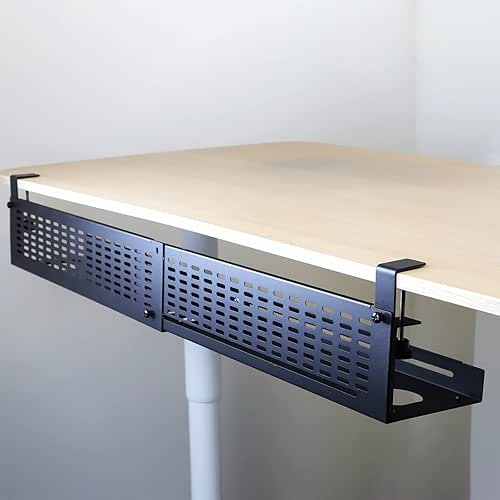
I used to spend my workdays accidentally kicking a “spiderweb” of cords under my desk. It made me feel scattered and honestly, it was a total dust magnet. I tried the plastic clips, but they always peeled off. What finally transformed my workspace was moving the entire power strip *off* the floor and onto the desk itself using a dedicated mounting system.
This approach follows ergonomic advice from Humanscale, which emphasizes keeping the floor area clear of obstructions for both safety and better leg movement [7]. By routing everything through a single channel, you create that “floating” look that makes a home office feel like a sanctuary.
The game-changer: Under-Desk Cable Management Tray

The Minimalist Remote Worker Loadout
If you’re working from a small space or a kitchen table, your goal is “packability” and zero visual noise.
- Essential: A high-quality tech pouch for your daily dongles and chargers.
- Essential: A 6-foot braided USB-C cable that doesn’t tangle easily.
- Pro Upgrade: A compact “snake” sleeve to bundle your monitor and power cords into one sleek line.
The Entertainment Center Hideaway
The area behind the TV is usually where cables go to die—and where the biggest dust bunnies live. Because these devices stay plugged in for years, heat management is crucial. The Spruce recommends using cable boxes that have ample ventilation slots to prevent power bricks from overheating [8].
I ignored my TV tangle for years until I realized the “mess” was actually visible from the side of my sofa. I spent twenty minutes bundling the HDMI cords and tucking the power strip into a dedicated box, and the visual calm it brought to my living room was worth every second.
The real win: Large Cable Management Box

The Home Theater Enthusiast Loadout
For those with gaming consoles, soundbars, and streaming boxes, you need high-capacity solutions.
- Essential: A large, ventilated cable management box (look for 16-inch models).
- Essential: Color-coded Velcro wraps to distinguish the PlayStation cord from the Apple TV cord.
- Pro Upgrade: Adhesive wall raceways if you’re mounting your TV and want to hide the “drip” of wires.
Final Thoughts
At the end of the day, organizing your tech isn’t about being a perfectionist. It’s about making sure your home supports your best life, rather than draining your energy with tiny, avoidable frustrations. When you clear the “box of shame” and tuck away those dangling desk wires, you’re creating space for the things that actually matter—like that next sourdough bake or a quiet evening without the glow of a messy power strip.
I’d love to see your progress! Share a photo of your “purged” cable box on Instagram and tag @BestGoodsGoodLife—let’s celebrate those empty boxes together!
Disclaimers & Notes:
This post contains affiliate links. I only recommend products that meet the “Good Life Test” for efficiency, durability, and aesthetics. Electrical work and cable routing should be handled with caution; always ensure power strips are not overloaded and consult a professional for permanent in-wall wiring.
Resources and Safety Standards
- Consumer Product Safety Commission (CPSC). (2024). Home Electrical Safety Audit. CPSC Government Safety Guides.
- National Fire Protection Association (NFPA). (2023). Electrical Safety in the Home Office. NFPA Standards.
- National Institute of Standards and Technology (NIST). (2014). Special Publication 800-88 Revision 1: Guidelines for Media Sanitization. NIST.
- Environmental Protection Agency (EPA). (2025). Electronics Donation and Recycling. EPA.gov.
- Procurri. (2025). A Beginner’s Guide to NIST: Clear, Purge, Destroy. https://www.procurri.com/2025/04/03/a-beginners-guide-to-nist-clear-purge-destroy/
- Simply Spaced. (2015). 7 Ways to Label Your Cords and Cables. https://simplyspaced.com/2015/09/7-ways-to-label-your-cords-and-cables/
- Humanscale. (2024). Cable Management Guide: A Comprehensive Approach. https://www.humanscale.com/insights/cable-management-guide-a-comprehensive-approach-to-organizing-cables-
- The Spruce. (2024). The 7 Best Cable Management Organizers to Declutter Your Space. https://www.thespruce.com/best-cable-management-5271358